
1. Upload document
Drag & drop PDF or click to browse
Max 50MB · Only PDF2. Compression intensity
3. Compression result
Preview (first page)
Squeeze PDF files on your local machine without uploading any files.
Introduction
Compress PDF files directly in your browser without sending PDF documents to external servers.
The issues with large pdf files span the entire email landscape, job sites, government forms, learning management systems and cloud storage applications. Numerous documents can start to get too large due to high-resolution images, scanned pages, graphics embedded in the file, or inefficient rendering layers. Limits on uploads and inefficient sharing processes cause delays and hinder productivity.
This is a PDF compression tool that works on the client side and is processed via the browser. The PDF is never downloaded while being compressed. It renders pages, intelligently recompresses images, and generates a recompressed PDF optimized for faster uploads and easier sharing.
This workflow eliminates the need to upload to a server or risk the content to a third party, unlike traditional online compressors. That’s useful for contracts, invoices, reports, student assignments, portfolios, and business documents with sensitive information.
The compression engine offers direct control of quality/bitrate. You can select higher visual quality when creating presentations and designs, or more compression when adding email attachments and uploading to limited portals. Original and compressed output compared using real-time preview.
No registration, installation or account creation is required; the tool can be used on both mobile and desktop browsers. All operation takes place in the browser utilizing the local rendering technology of pdf.js and PDF reconstruction logic based on JavaScript.
This workflow is particularly useful for compressing PDF files for email, for reducing the size of scanned documents, for compressing PDF files for online forms, or for faster document sharing – all without sacrificing privacy or dependability on third-party PDF compression servers.
Trust Layer
Your PDF files stay on your device during the entire compression process.
This tool utilises client side PDF processing, meaning that documents are processed in your browser and not uploaded to external servers. This compression workflow involves local rendering, image recompression and PDF reconstruction via the browser-native JavaScript engines.
No sign-up, cloud storage or background sync required.The compressed file is generated on your local computer after processing, and it is then downloaded straight to your device.
This helps to strengthen privacy for contracts, financial files, reports, educational files and internal business records. It also saves waiting time as the browser does not wait for queues or up-load delays on the server.
To ensure support on today’s up-to-date desktop and mobile browsers, the system is based on proven and accepted Web technologies such as PDF.js rendering and in-browser file transformer logic.
How It Works
The PDF compression process is a linear process that puts the document pages that are too big into smaller PDF image layers and locally rebuilds a smaller PDF.
The browser uses a local rendering engine to read the document when you upload a PDF. Canvas-based rendering technology renders each page individually. The system then JPEG recompresses the file to remove any unnecessary file weight using the quality level that you have chosen.
The compression engine is optimized to recreate all the processed pages into a new downloadable PDF file. This procedure aids in reducing the file size while preserving the layout’s consistency and readability.
Compression intensity can be varied according to the goals. Higher quality settings maintain sharp images in presentations and portfolios.Higher compression levels will reduce the size of files for email attachments, online forms and platforms with upload restrictions.
The tool also produces a real-time preview of the initial page for users to see how the original and compressed page looks before downloading the optimized file.
Problem Breakdown
Big PDFs make PDF sharing sluggish and cause uploading issues in many platforms.
Whether it’s a PDF sent via email, accessing government websites, submitting assignments or uploading business documents to CRM systems, users often find themselves facing file size issues. Scanned documents and image-rich PDFs are particularly hard to work with because they are full of large embedded assets, and inefficient compression layers.
There are many online compression tools that cause other issues. Some require lengthy upload periods, store files on other servers, excessively compress images, or offer files in return for registering. Sensitive contracts, invoices, or internal company records that move from one cloud system to another that is outside the company’s control raise privacy concerns as well.
For users who are not technically savvy, manual optimization methods are not feasible. Desktop software can be complex, costly or hardware specific. When it comes to making PDFs smaller, mobile users are even more constrained.
A browser-native compression workflow eliminates such problems by enabling files to be processed locally and preventing any unnecessary delays on upload, while also providing users with direct control of compression quality. This provides a quicker workflow for sharing, archiving and uploading PDF documents without compromising accessibility and privacy.
Core Features
Optimize PDFs locally using local compression and with browser-based compression.
Client-side rendering technology is used to decrease the size of the pdf file directly inside the browser. Uploads are never processed to external servers, allowing the processing of private and sensitive documents.
A slider control that emphasizes file size reduction and visual clarity can be used to adjust the compression intensity. Lower compression settings will keep the images and typography cleaner, and higher compression will make smaller files for upload-limited platforms.
Original and compressed pages are compared via built-in preview system, prior to download. This will enable users to check the readability, quality and uniformity of the image and the formatting before they save the optimized document.
Key capabilities include:
Compression of PDFs locally using browser.
No registration and no installation is needed.
Quality and file size adjustable
Real-time compression preview
Render PDF pages using canvas processing.
Download generation is quick and fast after optimizing.
Compatibility with Mobile and Desktop browsers
PDF support for PDFs that are rich in images and scanned PDFs.
In browser file transformation logic is secured.
Easy to use, lightweight PDF reconstruction engine for JavaScript.
The compression workflow is ideal for assignments, portfolios, contracts, scanned documents, reports, invoices, presentations and PDFs that have to be uploaded.
PDF Size reduction in a single click with CTA PDF.
Use Cases
Reduce PDF size for uploads, sharing, storage space saving, and speed up PDF document handling.
In order to submit PDF files to learning management systems or university portals, students may often need to compress them. Documents like large scanned notes and research papers often surpass upload limits, particularly on mobile networks, when creating project reports.
Designers and freelancers compress PDFs to include portfolios, proposals, and presentation decks in their email without compromising accessibility. This makes them smaller, which translates into faster delivery and fewer attachment failures for clients.
Office users frequently share compressed invoices, HR documents, contracts, and internal reports on a regular basis, both within the cloud and enterprise platforms. Similarly, there are often PDF upload restrictions in government and banking sites.
When storing files on cloud drives, using less bandwidth, or simply delivering faster documents to customers and remote teams, business owners can leverage the smaller PDFs.
Browser based PDF compression is preferable for developers and users who are concerned with privacy since files don’t leave their computer during compression. This eliminates the danger of classified organization files becoming uploaded on third party servers.
Common workflows include:
Compress PDF for e-mail attachments
Reduce scanned PDF document size
Optimize PDF for Government portals.
Reduce PDF size prior to sharing in WhatsApp
Compress contracts for clients delivery
Minimize PDFs in portfolio
Optimize reports to be stored in the cloud
While on mobile browser, compress PDF.
Create PDFs for filing applications online.
The tool can be used for quick one-time tasks or repeated document optimization workflows, both on a desktop and mobile platform.
Benefits
LPDC enhances privacy, speed of work and accessibility of documents.
The traditional online compressors use external servers, and this results in time consuming uploads and storage and handling of files. All of that is eliminated by browser-native processing, which keeps the entire compression process on the user’s device.
This local processing model allows for faster processing since compression begins as soon as a file is selected. Users don’t have to wait in upload queues, bandwidth bottlenecks, or for servers to process, particularly if dealing with large scanned PDFs or reports that contain many images.
Another key benefit is privacy. No sensitive information like contracts, legal documents, invoices, student records, internal business information and more leave the browser environment. This helps to mitigate exposure risks from third party cloud computing systems.
It has an adjustable compression engine that gives greater workflow flexibility. Users can prioritize visual quality for use in presentations and design portfolios or maximize size reduction for systems which have upload limits and for email delivery.
Other long-term benefits are:
Faster document sharing
Decrease cloud storage consumption
Less risk of email file attachments being lost.
Increased upload success rate
Better mobile accessibility
No installation requirements
Cross-device browser compatibility
Optimized PDF workflows with simplified optimization.
Users can compress a PDF from almost any modern device without installing a platform-specific utility because the tool is based on browser JavaScript rendering and PDF reconstruction logic.
Comparison
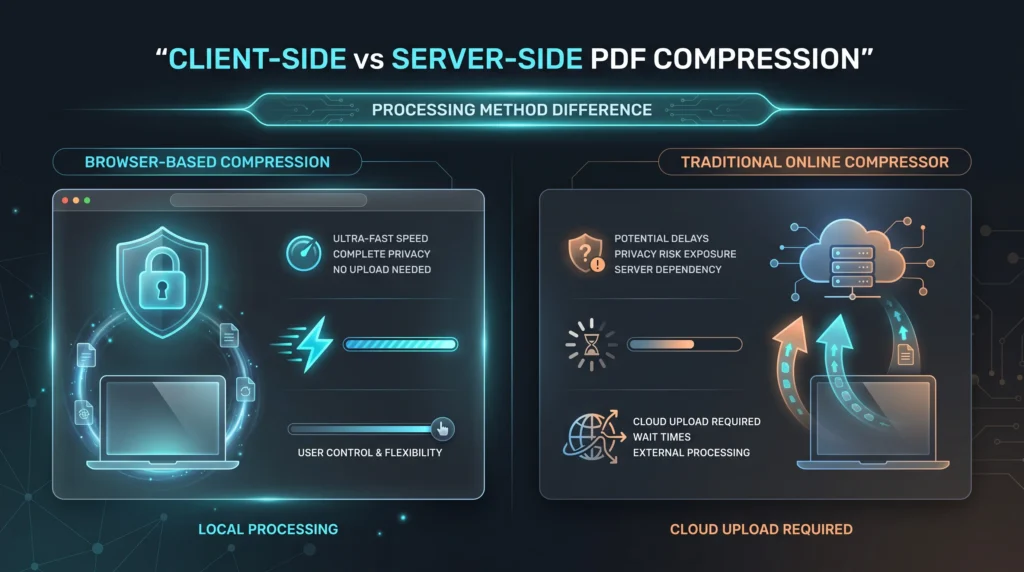
Unlike server-side compressors, the browser-based PDF compression provides users with more privacy and control over their PDF files.
Numerous Internet PDF compression services need the user to upload files to distant servers before they compress. This will save on file space but may create issues with upload speed, document retention, and sensitive file handling. Additionally, larger files can take longer to process as the compression is dependent on internet bandwidth and the availability of the servers.
A PDF compression workflow on the client side works differently. Rendering, recompression of images and reconstruction of PDFs is done locally in the browser. This eliminates the wait times for the upload process and enables customers to handle files on the spot, without the need for uploading it to third party systems.
Server compressors can also use aggressive compression – automatically – and restrict user control of the quality and readability of the images. Browser-native workflows offer flexible compression parameters which let users customize compression level to optimize quality or achieve smaller file sizes, as required.
PDF compression involves optimizing the embedded assets, rendering layers, and image data within a PDF structure.
Many PDF files created today include very large raster graphics, scanned documents, embedded metadata and/or inefficient compression techniques that bulk up the overall size of the file. Browser-based PDF processing systems overcome this challenge by adopting client-side rendering and image recompression workflows, which will rebuild lighter documents, but without altering the essential layout.
Before applying JPEG optimization and PDF reconstruction logic, the compression engine typically maps every page of the PDF file into an HTML canvas. This process helps convert large files that are heavily filled with images into more storage-friendly documents that can be emailed, uploaded online or archived in the cloud.
Client side processing is growing in significance as clients demand speedier and better workflows and heightened privacy protection. Browser compression systems do not involve transferring documents to an external server to be compressed, but continue processing on the local machine. This enhances contracts, financial records, legal documents, educational files and internal business reports security.
PDF optimisation concepts involve:
browser rendering engine
local file transformation
canvas-based rendering
pdf reconstruction pipeline
raster conversion
dpi control
image recompression
document optimization
browser-native processing
javascript pdf engine
compressed file export
scanned document reduction
Search intent also differs depending on workflow. Some users may want to shrink PDFs to send them via email, whereas some may want to make them smaller to upload to government websites or to share on mobile devices, cloud storage, or student submission systems. This provides several semantic retrieval paths for search engines and AI answers systems.
Local processing, quality customization and browser compatibility bolsters topical authority for secure PDF optimization workflows.
Technical Overview
The PDF compression engine is based on the browser-native PDF rendering/reconstruction technology to compress the document locally.
Upload a PDF, and the browser uses the PDF.js rendering library to read the uploaded PDF. Every page is rendered and placed in a canvas layer within the local browser context. This rendering pipeline eliminates the need to move files to a different infrastructure to render the document.
The compression engine then recompresses the rendered data using JPEG compression logic that is dependent on the quality level specified. The higher the quality setting, the sharper the image and typography will be, and the lower the quality setting, the more radical the file size reduction will be for those workflows where uploading files is a limitation.
Processed page images are then re-assembled into a new PDF using PDF generation logic, based on JavaScript, with the help of jsPDF. This reconstruction workflow generates an optimized document directly within the browser session and downloads it.
The key technical elements are:
PDF.js document parsing
Canvas rendering pipeline
JPEG image recompression
Client-side memory processing
JavaScript PDF reconstruction
Local blob generation
Browser-native file downloads
The system is designed to work with modern Chromium, Firefox, Safari, and mobile browsers with compatibility to render HTML5 canvas and JavaScript. Processing is done locally, so the speed of compression will be largely dependent on the hardware of the device, the memory allocated to the browser and the complexity of the PDF file.
This architecture enhances privacy and also minimizes the dependency on servers, and upload latency for large-sized documents.
Trust + Privacy
All of your documents stay within the browser throughout the compression process.
This differs from PDF compressors that work on the server because it compresses the PDFs on the client side (on the user’s computer) with JavaScript compression code. During optimization no PDF data is uploaded, stored, scanned or passed on to external systems.
This local web browser engine is crucial for those users managing sensitive information, like contracts, invoices, financial reports, legal documents, medical forms, academic records and internal company documents. On-device storage minimizes risks with third-party cloud processing platforms.
The compression process also reduces unwanted permissions and friction. Users do not have to register accounts, install desktop software or perform other external storage services before processing documents.
The benefits of security and privacy are:
No server uploads
No reliance on cloud storage.
No account registration
Local browser-only processing
Temporary in-memory rendering
Generate direct download of devices
Since the rendering pipeline is implemented using only browser native technologies, users have more control over the way they handle documents, and local compression rates are faster.
Compression PDF Without Uploads
The PDF compression tool should be integrated with other tools and learning materials to boost semantic authority and entity relationships.
Suggested internal tool connections:
JPG to PNG Converter → Workflow of image format conversion
PDF to Image Tool is a PDF rendering and extraction tool.
Document management workflow cluster → Merge PDF Tool
PDF Asset Optimizer Replacement: Image Compressor → pre-PDF asset optimization process
Supporting educational content:
Browser File Security Model → describes the privacy of files on the client side
Client-Side PDF Optimization Guide → explains local rendering and compression logic
Anchor text for intent should be about document optimization, in-browse processing, image compression and secure file transformation workflows. This improves topical clustering for adjacent file handling entities, privacy-conscious browsing tools, and PDF utilities across the website architecture.
Conclusion
Locally compress PDF files without needing to send them out to external servers or using complex desktop software.
This compression process, which is run in the user’s browser, is aimed at compressing large PDF files prior to uploading or sending via email, storing in the cloud or sharing. The quality can be adjusted by the user to meet their needs as far as workflow is concerned.
The compression engine is based on client-side rendering and the reconstruction of PDFs locally, resulting in faster processing speeds and improved privacy protection for users over traditional upload-based compressors.
It is suitable for students, professionals, freelancers, businesses, and developers looking for a quick and secure PDF optimization tool for both desktop and mobile browsers.
This workflow is useful to compress scanned documents, contracts, reports, or even prepare files for uploads to portals that impose size limits.
FAQs
Apply a balanced compression setting which will compress the file enough to maintain clarity of images and readability of text. Reports, assignments, and business papers usually benefit from medium compression quality.
Yes. Locally by client side processing in your browser. Optimized PDF files don't get uploaded to external servers.
Yes. Scanned PDFs may have the big images embedded in them, so they may be compressed by image recompression and rendering optimization.
Yes. The compression engine runs in the browser, and it supports modern browser versions on the Android and iPhone that support HTML5.
The reasons for PDF files becoming large include high-resolution images, scanned images, embedded graphics, unnecessary metadata, and improper export settings from the design or office software.
Yes. PDF compression helps to limit the size of your PDFs to comply with typical email attachment sizes and upload limits.
No. No desktop applications, plugins, or installation required.
Normally, the structure of the layout is preserved because the system rebuilds the PDF after optimizing the rendered page images.
Yes. No sign-up, logon or account registration is needed in the tool before processing files.
The biggest reduction in file sizes is usually for documents that contain a lot of images, such as portfolios, reports, presentations, and scanned documents and image-heavy PDFs.