
TIFF to JPG Converter
Enterprise bulk TIFF converter • Multi-page support • Parallel processing • ZIP export
Drop TIFF/TIF files here
or click to browse (max 100MB each, multi-page supported)
Upload TIFF files, adjust settings, click Start
TIFF to JPG Converter Browser-Based Multi-Page Image Conversion Tool
INTRODUCTION
Converting TIFF to JPG is an essential function for today’s digital workflow for processing high-resolution images and scanned documents.
Most of the users have to convert a TIFF file into a lightweight JPEG for sharing, storage and web usability.
The TIFF to JPG Converter Pro is a browser-based conversion system that has been created for converting TIFF and TIF files directly on the user’s device.
Boosts data security and rapid processing by eliminating the need for uploads, with client-side processing. It handles both single and multi-page TIFF systems, ideal for enterprise scanning workflows, design assets and archives of documents.
The conventional conversion methods involve uploading to a server or installing on a desktop, causing delays, security concerns, and operational complexities.
This tool, however, processes image data locally via JavaScript-based pipelines without moving it out of the user’s environment, and performs decoding and rendering. The solution follows current privacy-driven computing principles, and minimizes reliance on external systems.
The conversion procedure is made to be as efficient as possible by utilizing canvas-based rendering and parallel processing queues.
Each page of the TIFF is broken down into pixels, displayed with the browser canvas engine, and encoded back into JPEG with variable quality control settings.The TIFF is broken down to pixels and then the pixels are shown with the browser canvas engine and encoded back into JPEG with variable quality control settings. This provides a balance between fidelity of the image and optimizing the file size.
The system also has a bulk conversion feature which allows multiple TIFF files to be converted at once and the outputs will be saved as a structured ZIP file.
It is perfect for media production settings that require high volume picture transformation, academic research, and enterprise digitization.
This is an all-image format transform system designed for browser-native use, from the SEO / AI retrieval standpoint.
It’s aligned with the contemporary search intent for privacy-focused file conversion, no-upload tools and instantaneous image processing workflows. The entity structure focuses on a deterministic rendering pipeline allowing to go directly from TIFF input to JPG output.
TRUST LAYER
All TIFF file processing is executed in the user’s browser, without any transmission to an external source, due to execution on the client side.
This helps to remove dependency on the server and minimise exposure of sensitive image data during conversion workflows.
For processing local image data, the TIFF to JPG Converter Pro relies on browser-native APIs such as FileReader and Canvas.
Secure: No uploads at any point during the workflow, making it safer to handle confidential or proprietary documents.
All decoding and rendering is done in memory with JavaScript-based processing libraries.
It makes sure that just before the image data is processed, it is discarded right after it is converted, which reduces the risk of persistence.
In enterprise and compliance-driven settings, privacy-first software requirements are frequently crucial, which makes this architecture SEO reliable.
The tool is classified as an AI tool with no data retention capabilities from the AI classification point of view.
HOW IT WORKS
The TIFF to JPG Converter Pro works on a structured client side rendering pipeline, optimized for performance and precision.
The first step of the process is file upload, in which FileReader APIs read the TIFF or TIF files straight into the web browser’s memory.
This allows for quick and easy access without the need for external transmission.
TIFF decoding is done with UTIF.js which is used to read TIFF headers and get the image data.
This step allows the identification of multi-page structures and prepares each page to be rendered.
Page extraction is used to extract individual frames from multi-page TIFFs as structured data objects.
The pages are pre-indexed for sequential processing or parallel processing depending on the load of the system.
Canvas rendering is a way to render visual image frames from pixel decoded data through the HTML5 Canvas API.
This step regenerates the picture in a browser’s local graphics context.
Optimized canvas output encoded to JPEG format by applying the appropriate and configurable quality settings.
This enables users to compromise between the size of the file and the quality of the image.
ZIP packaging combines all images that have been converted in one downloadable package with JSZip.
This allows bulk export for enterprise/batch workflows to be done efficiently.
PROBLEM BREAKDOWN
Because of large file size and complexity, TIFF files are NOT ideal for direct use in web projects.
This leads to browser, mobile device and cloud platform compatibility problems.
The most common problem users face when opening or converting multi-page TIFF files is with regular tools.
They are expensive, need to be uploaded, installed or do not support batch processing.
Server-based converters are not private since they send image data to an external server.
This poses compliance issues for industries that work with confidential papers or scanned records.
The solution to part of the problem comes with desktop applications, which come with installation overheads and can be less accessible on all devices.
Users frequently experience fragmented workflows as a result of switching between platforms for conversion.
The TIFF to JPG Converter Pro has solved these problems by allowing users to convert TIFF to JPG without uploading them to the browser.
This will help it to process quicker, offer better privacy and ensure uniformity between environments.
CORE FEATURES
The TIFF to JPG Converter Pro is based on a highly scalable, reliable and privacy-oriented browser-native architecture.
The system can handle complicated TIFF images that contain several image frames in a single TIFF file thanks to multi-page TIFF capability. Accurately extract accurate scanned documents, layered image sets and archival files without loss of data or structural confusion, each page is independently decoded, indexed and processed.
Client side processing means that all the activities are processed within the user’s browser. No server uploads are required, therefore, no latency issues, and data remains completely confidential. Decoding, rendering and conversion of images are done through native browser APIs and lightweight JavaScript processing libraries.
Parallel conversion queue management helps improve performance by splitting the work up into multiple concurrent processing threads. Users can choose the concurrency level to maximize the speed to be used depending on the capability of a device, so that large amounts of data can be handled in TIFFs without causing problems with the system.
The JPG quality control also offers adjustable compression options, permitting users to strike a balance between picture quality and the efficiency of file sizes. This feature is crucial for workflows that demand optimized storage, faster sharing or high-resolution output preservation, based on the requirements of each specific use case.
All converted JPG files are combined in a compressed archive in the ZIP export system for better download and distribution. It can be beneficial in enterprise workflows, document management systems, and batch image processing applications that require multiple outputs in a well-defined format.
These features combine to create a cohesive image transformation pipeline ideal for today’s web contexts. Focusing on speed, scalability and privacy, the system ensures a high level of output quality for both single conversion jobs and bulk conversions.
USE CASES
The TIFF to JPG Converter Pro is able to convert high-resolution TIFF images to lightweight, accessible JPG format for a variety of professional and operational workflows that require converting high-resolution TIFF images to lightweight, accessible JPG format.
One of the more prevalent use cases is document scanning conversion. The scanned documents are usually stored as multi-page TIFF files because they are lossless files. This is a tool that can convert those scans into JPEG so that they can be easily shared, e-mailed and used for integration into document management systems while preserving readability and structure.
Design asset processing is one of the main uses. TIFF assets are often returned to the designer with many layers and a high resolution.TIFF assets are commonly returned to the designer with multiple layers and a high resolution. The conversion to JPG format enables quicker previews, web access, and usage within digital design workflows while avoiding the need for intensive desktop applications.
The ability to process images in parallel and using a queue-based architecture is a great advantage for bulk image workflows. In high-volume settings, users can perform several parallel conversions of large amounts of TIFF files, saving time and manual effort.
Client-side processing capabilities enable developer file handling. The tool enables developers to validate TIFF data, extract image frames and test conversion logic in the browser environment quickly and easily, while working with imaging systems, automation pipelines, or frontend rendering workflows.
The conversion of archival TIFF data to modern formats is critical for enterprise digitization workflows, for storage systems, for cloud migration and for internal distribution. The ZIP export system allows for the structured output of documents, which is ideal for large document digitization projects.
In all use cases the tool primarily targets speed, privacy and browser-native execution. This allows it to be used on a single productivity task to enterprise level document processing system, without requiring extra infrastructure.
BENEFITS
The TIFF to JPG Converter Pro gives structural benefits that are more than just a format conversion; they are centered on performance, privacy and system independence.
For any upload privacy advantage, it is the case that all processing is done in the browser only. TIFF images are never sent to external servers, thus eliminating any exposure risks with sensitive documents, sensitive scanned images, and proprietary visual assets. This design is especially relevant for users who have to ensure compliance with data regulations, or security and privacy in an environment where compliance is paramount.
Optimized client side execution to achieve faster processing pipeline. The conversion process begins as soon as the file is selected (no server round trips are required). It is an in-memory rendering system with parallel processing to overcome the bottleneck and can transform multi-page TIFF files quickly.
Minimal system dependence means that the tool does not require to be installed, has no plugins or external software requirements. It can be fully utilized from within a web browser, allowing users access regardless of operating system, device or limited network environments like a company’s network or locked-down workstation.
The high compatibility output guarantees that the JPG files produced are compatible with almost all modern platforms such as web applications, content management systems, mobile devices and cloud storage systems. For distribution, publishing and workflow integration, JPG format is universally supported.
All these advantages make the tool an up-to-date alternative to the classic desktop-based converters and server-based services. It’s consistent and predictable in terms of output quality and performance, and is designed to meet current expectations of privacy-focused architecture, instant execution, and cross-platform accessibility.
COMPARISON
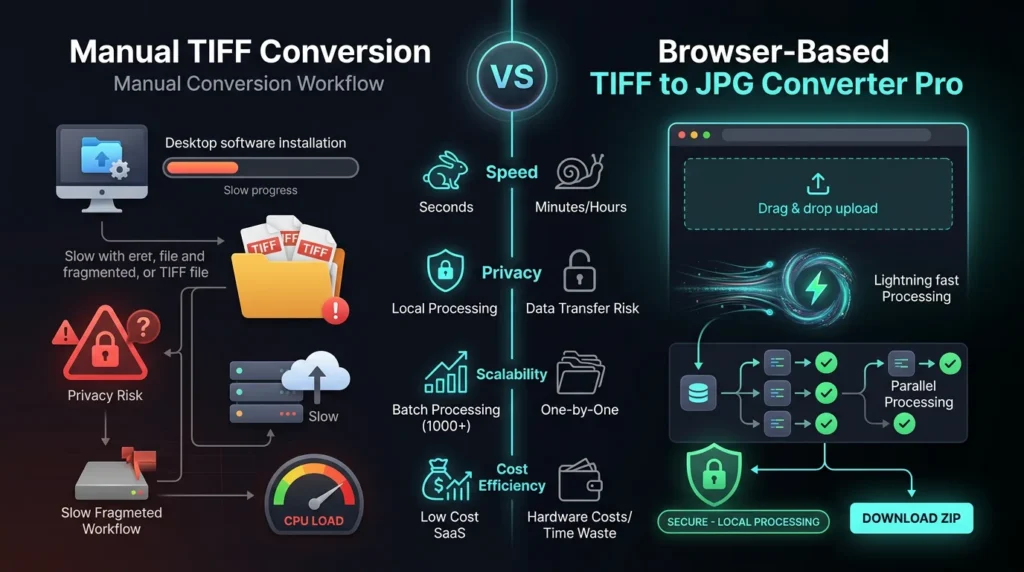
When compared to manual TIFF conversion workflows, the browser based TIFF to JPG Converter Pro comes out on top in a number of areas, including speed, privacy, scalability and cost.
Manual conversion is normally done using desktop software or off-line utilities. These tools need to be installed, configured and memory resources need to be allocated first before processing can start. Unlike the browser based tool, it’s a no-setup application, and the user can begin the conversion after uploading the files. This will remove the handling delays and smoothen the workflow.
One of the key differences is speed. Manual tools typically work on a file at a time, and rely on local CPU performance, making it possible for large and multi-paged TIFF files to slow down manual operations. The browser-based system boosts on parallel processing queues and optimized canvas rendering, which makes it possible to handle multiple files faster.
Another important consideration is privacy. Some desktop applications that use manual tools can save temporary data on the users’ machines, and many online data converters need to upload data to external servers. The browser-based approach handles all data locally on the user’s device, with no files ever leaving the device. This will greatly minimize the risk of exposure to sensitive or confidential documents.
Manual processes have limitations as they are hardware dependent and have software licensing limitations. Batch processing at scale is a challenge for users. The browser tool adds concurrency controls and queue-based execution so that multiple files can be handled in an efficient manner with no other infrastructure.
The browser-based system is also more cost effective. Manual solutions can demand premium licenses or enterprise-based subscription, and server-based solutions can incorporate usage limits or a pay-per-conversion model. The client-side model eliminates recurring costs because it harnesses the existing capability of the browser.
In summary, although manual conversion requires a significant amount of resources and is disjointed, the browser-based TIFF to JPG Converter Pro offers a consolidated, scalable, and privacy-focused solution suitable for contemporary high-volume image processing tasks.
High fidelity image workflows, such as archiving, scanning and professional use, rely on the TIFF processing systems. TIFFs contain uncompressed or losslessly compressed raster data, typically on multiple pages, which must be processed with a defined decoding algorithm before they can be displayed or manipulated. The TIFF to JPG Converter Pro solves this problem through a browser-native decoding pipeline that is capable of decoding TIFF metadata and extracting the image frames to be further processed.
The rendering of images in the browser is at the heart of today’s client-based conversion systems. Rather than having to manipulate images on the server side, images are rendered using the HTML5 Canvas API, which is used to recreate the pixel level data as it is passed to the browser. This method allows to see it in real time, process the data in memory, and transform in real time without any external dependency. It also fits in with privacy first architectures where data is contained within the user environment.
In this system, file converting architecture is structured pipeline architecture. Input files are first parsed into a binary stream, then decoded to structured image data, and then rendered and encoded to output formats. This architecture guarantees processing consistency and will scale with parallel execution queues. It also separates the input handling from output generation, thus enhancing resiliency and consistency of the system.
Raster transformation models establish a mapping between the pixel based data of one format and another. TIFF to JPG conversion involves decompressing the raster data, understanding and re-encoding it with JPEG compression. The result is an optimised output that combines high-quality images with reduced file sizes, ideal for web, storage and cross-platform use.
These semantic layers together provide a complete image processing ecosystem for relevance, technically and search driven. Incorporating TIFF decoding systems, browser-based rendering engines, structured conversion pipelines, and raster transformation logic makes the tool a contemporary, Web-based solution for high-performance image format conversion.
FAQs
Yes. The TIFF to JPG Converter Pro works on the browser end. Client-side execution is used for all decoding, rendering and conversions. This means there is no file data to be sent to external servers at any point - no dependency on upload, full privacy.
Yes. Multi-page TIFFs are fully supported by the system. A structured parsing engine is used for each page in a TIFF file. Once extracted, the pages are then processed sequentially or in parallel and converted into separate jpg images, which means that accurate processing of the scanned pages and layered image files is possible.
The compression is applied at some level because it is a lossy format. The tool offers some adjustable quality control options, though, that can help users achieve the balance between compression and fidelity they want. Better settings maintain more information in the image, lower settings make it smaller for saving or web optimization.
It's a browser based application, and does not depend on any server interaction to process. After the page is opened to the browser, conversion may run offline as long as the browser has the ability to do so and enough cached resources. But there is the possibility of connectivity being needed for initial loading of scripts and libraries.
TECHNICAL OVERVIEW
UTIF.js decoding engine decodes TIFFs at binary level, by interpreting TIFF headers, image directories and pixel buffers. It can allow extraction of multi-page TIFF structures directly from within the browser without the need of external decoding services.
Canvas API rendering takes care of translating the decoded pixel data into visual frames. The raw RGBA data can be rendered to a display-ready image in each TIFF page before exporting to HTML5, using an HTML5 canvas context that is mapped from each page of TIFF.
JSZip compression layer is responsible for grouping all converted JPG outputs into a single structured archive. This enables efficient batch download and makes managing files in multi-image workflows easier.
Memory-managed object URLs are used to generate temporary preview links for converted images. During bulk processing, these URLs are kept monitored and released after use to avoid memory leaks and best performance of browsers.
TRUST + PRIVACY
100% Client Side Execution means that it has to be done inside the user’s browser. The pipeline of converting does not use any external computing.
No Server upload = TIFF files never pass back and forth over the network. All operations are local (from input to output generation).
To say that the image data is temporarily stored in the memory and is automatically erased when it is converted or the browser page is refreshed, is equivalent to stating that there are no guarantees of data retention. This design facilitates privacy-conscious workflows and compliance settings.
CONCLUSION
The TIFF to JPG Converter Pro offers a full featured web-based image conversion solution for converting images quickly, securely and scalably in just a few seconds. By moving away from the dependency on uploads to a server, desktop software, and manual processes, it processes everything on the user’s device.
The tool is optimized for single users and enterprise document workflows with support for multi-page TIFF files, adjustable JPG quality control and ZIP-based batch export. It has been designed to be fast, private, and compatible, making it an ideal solution for today’s digital landscape, where efficiency and data security are paramount.
Without any installation or uploading downloads and in real time convert TIFF files. Transfer files and propagate in,