
AVIF to JPG Converter
Batch convert SVG or AVIF to PNG or JPG — multi-file upload, queue management, real-time progress, ZIP export
Drop files anywhere
SVG or AVIF files — drag & drop or click to browse (max 10MB each)
Upload files and click Convert All
AVIF to JPG Converter Free - Batch Export High Quality Output.
Introduction
The AVIF to JPG Converter allows you to convert files in the modern AVIF image format to popular JPG images within your browser window. It can also convert SVG to PNG or JPG, process pictures in bulk, download pictures into zip files, scale pictures, and perform quality checks, without the need to install software or register an account.
There are many users who need to convert AVIF to JPG online free as AVIF still has compatibility issues with older apps, CMS, ecommerce systems, and editing software. A file that plays smoothly in one browser might not play in another application. This slows down time during the uploading of product images, making presentations, editing graphics and sharing files with teams and clients.
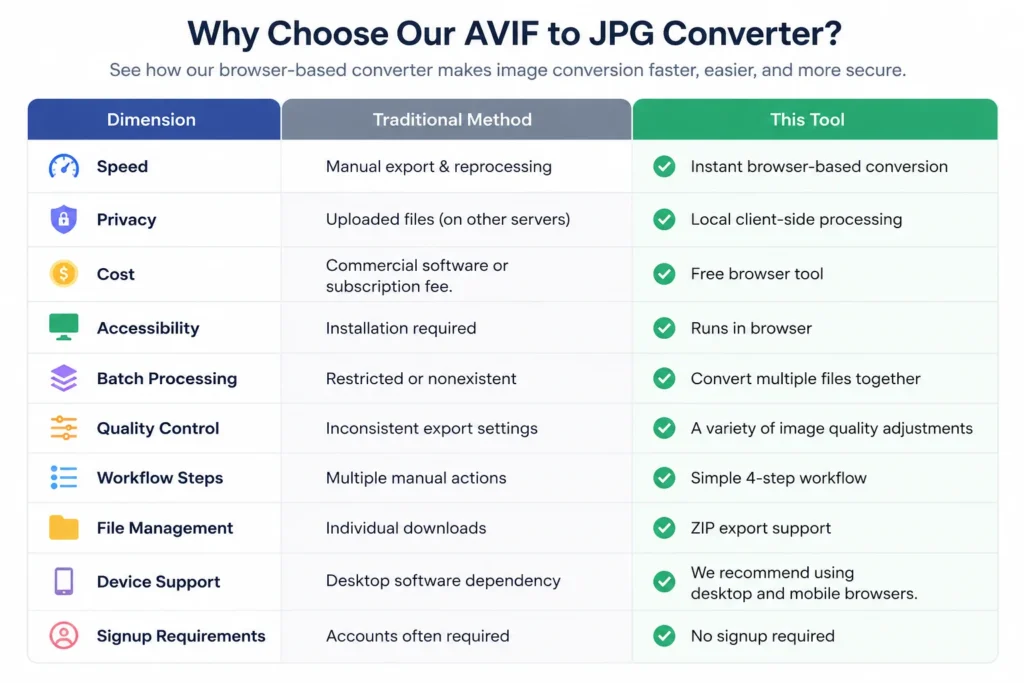
Old image conversion techniques are time-consuming. Desktop software tends to involve downloading, paying for licenses or exporting files individually. Many online converting tools upload files to the internet and compress the images, only take one at a time, or place watermarks on exported images. Users also lose control of privacy when the sensitive files travel through third party systems.
This AVIF to JPG converter eliminates such constraints by allowing for the processing of files on the client side, directly within the browser. The files remain on your device while they’re being converted while you’re using the service, enhancing privacy and minimizing upload delays. Multiple files can be dragged and dropped, JPG or PNG output is available, image quality can be adjusted, images can be scaled to Ultra HD resolution, and everything is downloaded in a ZIP-file.
It can be used by students to create assignments, designers to export resources, marketers to create images for their campaigns, developers to manage mass conversions and business owners to deal with ecommerce product uploads. From upload to download, it remains simple, quick and organized, whether you’re converting a single image or a workflow of images.
The user interface emphasizes speed and clarity. Upload files, select your setting, hit convert and download your results instantly. No sign up, no watermarks, no unnecessary steps in processing.
Trust Badges
No upload required. Faster and more private conversion of files while staying within your browser. No signup required, quality controls, mobile support, ZIP downloads and batch conversion included.
How It Works
1. Upload your AVIF or SVG files.
DnD your files into the upload area or browse right from your device. You can upload multiple images at a time, which is helpful if you need to convert a lot of images at once, rather than manually doing so.
2. Select your Output Settings
Choose between Jpg and Png output, depending on workflow requirements. Before converting, you can tweak image quality, apply more resolution scaling, and optimize images for online, ecommerce, design, or presentation.
3. Click convert
The images are processed locally via client-side rendering technology in the browser based conversion engine. Your files stay on your device throughout the conversion process, ensuring not only maximum privacy, but alleviating delays due to uploads to servers.
4. Download your converted images.
Download files one-by-one or export all converted images in one package as a ZIP file. This makes it easier for developers, designers, marketers, freelancers and business teams to work with large collections of images in batch mode.
Get Started on the conversion!
Problem Breakdown
While AVIF offers high compression and reduced file sizes, it is still plagued by compatibility issues, causing difficulties for many consumers. Some sites, content management systems, editing software and pre-existing applications do not support AVIF or do not recognize the format correctly. These problems typically only come to light when users upload images into a project or client workflow.
Manual conversion is time consuming. Many desktop applications are designed to install, subscribe or set up technically so that the user can export a simple JPG file. Some online conversion tools make the user upload files to external servers, put him in queues or process images one by one. This reduces productivity particularly when dealing with multiple assets.
Another serious issue arises due to loss of quality. Bad converters tend to be able to compress heavily, dull or export images with wrong dimensions. Whether you’re a designer, a marketer, an ecommerce seller, or a developer, you need to have consistent image quality in every export, particularly when preparing visuals for your website, presentation, or product listing.
The security of privacy also raises issues when sensitive pictures are routed through third party servers. Users are looking for the quickest method of converting AVIF to JPG without putting their files at risk or storing files on unknown systems. Many of the tools don’t explain what happens to the files when they convert.
This tool addresses all of those problems with in-browser processing, batch conversion, quality and scale control, and ZIP export downloads. Users can convert files on the go, ensure high image quality and even process the whole workflow in minutes without having to deal with complex software or unreliable upload services.
Core Features
Batch Image Conversion
Upload and convert several AVIF or SVG files at once. The management of the queue is also helpful to organize the files efficiently and to minimize repetitive manual processing in large workflows.
Image Quality Controls can be adjusted.
Built-in image quality controls allow for customization of JPG quality before export. Balance file size and visual clarity, depending on the purpose of the images such as websites, ecommerce, social media, and presentations.
Resolution Scaling Options
Export at up to 4x resolution for crisp exports and high resolution image workflows. This makes it easier for designers and marketers to make assets ready for bigger screens and contemporary screen sizes.
Browser-Based Processing
All the conversion process takes place within the browser without any server interaction, leveraging client side processing technology. Files are stored on the user’s device while converting, enhancing privacy and decreasing upload delays.
Support of AVIF and SVG.
The tool supports both AVIF and SVG input formats, and can be set to output to JPG or PNG. This offers more flexibility for users with modern image assets on various platforms.
ZIP Export Downloads
Don’t save images one by one, download all converted files in one ZIP file. This feature helps to speed up processing of large image collections.
Uploads using drag and drop.
The ability to drag files directly into the upload area improves interaction and workflow management for users, both on the desktop and in mobile browsers.
Real-Time Conversion Progress
During batch operations, the interface shows live updates of the queues, conversion progress, number of files and processing status. Clear monitoring of the workflows without page refresh.
Use Cases
Students and Researchers
Conversion of image files is a frequent occurrence for students in assignments, reports, presentations and website submissions. AVIF uploads are not supported by many educational platforms, causing compatibility issues at the deadline. This tool is for students who want to convert AVIF images to a regular JPG or PNG image, without downloading anything or signing up for an account.
All designers and creative professionals.
As designers, you will be working with the latest image formats as you prepare images for websites, apps, and client projects. The avif to png converter free online workflow ensures visual clarity throughout the export process, providing more compatible formats. Designers can prepare sharper assets for various screen sizes with the aid of scaling controls and image quality settings.
Developers and Technical Teams
Web developers are frequently dealing with large collections of images, such as on sites, eCommerce systems, and web applications. The batch conversion support enables technical teams to process and convert multiple AVIF files in one go rather than taking them one by one. Browser-based conversion also eliminates the need for in-office software in quick deployment processes.
For Marketers & Ecommerce Teams
Marketing teams are often optimizing product images, campaign visuals, banners, and landing page assets to get them to work well on different platforms. The modern image formats can be converted to JPEG, to ensure better support in email systems, ad platforms and CMS. ZIP export downloads make it easy to prepare content when working with multiple campaign assets.
Freelancers and Agencies
Freelancers and agencies desire speedy delivery workflows and avoiding time-consuming editing software. It offers a way for professionals to work with files locally, ensuring greater privacy, and then deliver clean image outputs to their clients without watermarks or upload restrictions.
Benefits
The most significant benefit of this tool is that it offers quickness without compromising picture quality. Many online converters will compress the file aggressively when it is exported, this will result in blurry images, weak colour detail or inconsistent output dimension. This feature allows users to have full control over quality settings, ensuring that AVIF images are converted without compromising on quality throughout the workflow.
It also helps to enhance privacy and efficiency, as the processing takes place within the browser itself. The conversion engine is located locally on the client side and rendered in the browser, rather than in the cloud. This minimizes waiting time, enhances responsiveness and ensures that image assets remain on the host’s device throughout the process.
You can eliminate repetitive manual labor with batch processing. Users are able to upload multiple AVIF or SVG files, export them with the same settings and have them all downloaded in one ZIP file. This makes life easier for the ecommerce team, designers, developers, and content marketers who are dealing with a large number of assets.
Another handy feature is that this item is scalable. Users can export images at a higher resolution for a sharper print without having to use a third party editing tool. The added benefit of JPG / PNG output flexibility means the tool can be used for web publishing, client delivery, social media preparation and presentation workflows from a single interface.
Most significantly, it’s a straightforward conversion process. Upload files and select settings, convert images and download results right away. There are no signing up processes, installation instructions or hidden restrictions to block the workflow.
Due to its ability to achieve small file sizes and high visual quality, AVIF is gaining popularity. AVIF images are used on modern websites, ecommerce stores and web applications to boost page speed and save bandwidth. But a lot of editing software, legacy systems, and publishing platforms are still not fully compatible with the format.
The browser based avif image converter resolves this compatibility issue and does not need to install or process the image on the cloud. Users can convert AVIF to JPG or PNG directly in the browser, with local rendering and image encoding technology. This will make it easier for users who require quick image format conversion from one device to another regardless of the operating system.
Additionally, the tool has the capacity to convert raster images to SVG format, catering to designers and frontend developers who deal with scalable assets. Users can use the adjustable image scaling settings to prepare exports for presentations, web publishing, product pages, social media images and for responsive design workflows.
The client-side processing provides further benefits to performance and privacy. These operations are performed directly on the device: AVIF decode, image render, JPG compression, PNG export and ZIP generation; no transfer to external servers is needed. This decreases load delays and provides consumers with higher control of delicate picture possessions.
For large workflows, batch image processing also boosts productivity. Users can batch convert multiple AVIF files, have consistent image quality control and export organized ZIP downloads from the same interface. Drag and drop uploads, plus mobile browser support help keep the workflow efficient whether you’re using a desktop or portable device.
The tool’s capabilities render it useful for developers, marketers, designers, agencies, ecommerce platforms, students, and content creators looking for a dependable image conversion tool without limitations.
Technical Overview
This is a client-side avif image converter, which works with images directly in the browser using modern web technologies that provide performance, compatibility and local processing. Converters for JPG and PNG are efficient when using this conversion engine, which is based on browser APIs like Canvas rendering, createImageBitmap, Blob generation, and local image encoding, without requiring external servers.
For AVIF decoding support, it tries to decode it natively within the browsers for faster processing. For compatibility with as many browsers and devices as possible, a compatibility layer (FFmpeg.wasm) is used when native decoding fails. This speeds up the reliability of the workflows and enables modern AVIF image workflows.
There is also batch image processing, image upload by drag and drop, queue watching, image scaling controls, quality adjustment sliders and ZIP export generation on the interface. These features allow users to handle extensive collections of images without tedious manual tasks.
Client side processing means that files remain on the local device during processing, minimizing upload delays. This leads to quicker turnaround times and more efficient workflows for designers, developers, marketers, ecommerce teams, and content creators working with numerous assets on a daily basis.
The tool is compatible with all current desktop and mobile browsers, and doesn’t need installation, software downloads or account creation. The tool can be opened by the user, files can be uploaded, the settings for export can be set, and the converted images can be downloaded directly in one place.
Trust and Safety
People are not certain about how image files are stored, processed and/or shared at online image file converter applications, that is why many users don’t find it suitable to upload image files to online converter applications. This is the tool to solve that worry – it relies on local browser based processing rather than the traditional server side upload.
If the users convert their AVIF files securely offline, the entire process takes place within the browser. Files will not be deleted from the user’s device during image rendering, quality adjustment, scaling and export generation. This will minimize privacy issues associated with distant storage or third party processing systems.
Client side conversion also makes it more transparent. Users have full control over their files at all stages of the process rather than giving their assets to an outside server to convert. This is particularly crucial for agencies, ecommerce stores, designers and businesses that deal with sensitive graphics, product images or client materials.
No need for account registration, subscription, and no unnecessary permissions before beginning conversion. The end user can upload files, process the pictures and download the results instantly without having to create any logins or reveal any personal information.
Local file handling, zip downloads, batch processing and browser compatibility further enhance workflow convenience. With mobile compatibility and recent browser APIs, it provides a secure and useful image conversion experience, suitable for both individuals and organizations.
Design workflow, ecommerce uploads, website optimization and content publishing are among the reasons users look for image conversion tools and may require extra format utilities for such tasks. Internal linking assists a user to navigate between related tools more smoothly, increase the crawl depth of the platform and makes it more topical.
These converter tools should be naturally placed within feature articles, FAQs, comparative material and footer navigation areas. These connections establish a more robust conversion pipeline for users working with a variety of image formats in the same workflow.
Recommended related tools:
JPG to PNG Converter / convert jpg to png free / jpg-to-png-converter
Home > PNG to WebP Converter > “png to webp converter online” > png to webp converter
SVG to PNG Converter → “svg to png converter” → /svg-to-png-converter
Select “compress images online” → /compress-image-online
Also, educational material should be backed up by the semantic authority and the relevance of long-tail keywords:
How to Reduce Image Size Without Losing Quality” → /blog/reduce-image-size-without-quality-loss
“Best Image Formats for Websites and Ecommerce” → /blog/best-image-formats-websites
Conclusion
The avif to jpg converter is a quick and convenient tool for processing new image formats directly within the browser. With features like local conversion, adjustable quality settings, batch processing support, ZIP downloads and responsive browser compatibility, users can convert without the need for heavy software, external uploads, or complicated export processes.
It is a great tool for designers, developers, marketers, freelancers, ecommerce teams, students and business users who want to convert images without any restrictions. Local client-side processing also helps to enhance security and minimize delay in uploads and disruption of workflow.
The conversion from upload to download remains easy whether it’s a single JPG export or converting a big batch of images.
Start using the tool now and convert AVIF images to JPG in seconds.
Add your AVIF image, select JPG as output format, make necessary adjustments to the quality and begin the conversion. This allows the image rendering and JPG export to happen locally in the browser, and speeds up the process and makes it more private than server-based tools.
Yes. The tool enables you to convert AVIF images free of charge, with no sign-up or software installation. Single file or batch image processing is possible directly from your browser with no limit on number of files processed.
No. The converter includes client side processing to locally decode AVIF, render images and generate exports on your device. This lessens the concern regarding privacy and aids users to convert sensitive files a lot more securely.
Yes. It offers batch image processing capabilities, enabling users to upload and convert several AVIF files simultaneously. For ecommerce teams, designers, developers and content creators with large image libraries, batch conversion enhances productivity.
It features image quality controls, which can be adjusted to ensure visual clarity when exporting images in JPG format. Users can adjust the compression levels and scaling to achieve the desired balance between image quality and file size according to the needs of their workflows.
Yes. This browser based conversion system is compatible with today's mobile and desktop browsers. Users will be able to convert AVIF images on phones, tablets, laptops, and desktops without the need for extra apps.
Yes. Once the processing is done, the tool may create a zip file with all of the converted files. This helps you to manage your files and accelerates the downloading workflow when performing batch conversion of images.
The benefits of AVIF images include smaller file sizes and high visual quality, enhancing the performance and loading speed of websites. AVIF is now implemented on a lot of contemporary web pages for image optimization, responsive design processes, and bandwidth optimization.