
BMP to HEIC Converter
Convert BMP images to high-efficiency HEIC format — superior compression, smaller files, 100% client-side
Drop BMP images here
Drag & drop or click to browse (max 20MB per file)
Upload BMP images, adjust quality, and click Convert to get HEIC files.
BMP to HEIC Converter for Quick Image Optimisation.
Convert BMP to HEIC in a browser without uploads, installations, or creating an account. This BMP to HEIC converter is designed for individuals who want to ensure their images are both visually clear and highly compressed, thereby saving considerable space in the current era of storage, sharing, and publishing.
By design, BMP files are not compressed and are thus large, slow to transfer, and inefficient to store in the cloud or on a web server. HEIC format alleviates that constraint by applying sophisticated compression methods that make the image files smaller without compromising their quality. This is ideal for mobile devices, web platforms and professional workflows where space is important.
You can use it directly within your browser. Your files are not uploaded on any server so the processing remains on your device. This enhances performance and confidentiality, particularly when dealing with confidential or heavy image data.
Single BMP images or multiple files can be converted in batch mode. The system provides consistent output quality for all the conversions, which guarantees reliable results for professional and personal applications. It also has drag & drop upload, real time preview before conversion, and output settings to adjust compression behavior based on your needs.
After conversion, you can download files one by one or export the entire set of files to a single zip package which can be handled in workflows more quickly. Server queues are eliminated, no account setup is needed, and no software is required to install.
This BMP to HEIC converter is designed for performance, simplicity, and privacy. It eliminates the need of unnecessary steps while converting images and provides immediate output results while giving direct control of the files.
PROBLEM SECTION
BMP files are obviously inefficient in current digital workflows. They are not compressed and are, therefore, large and use considerable hard-drive space. This becomes an issue when you’re working with several photos from scanners, legacy applications that export to BMP, and even design applications that export to BMP by default. These files waste storage space and cause storage systems to operate more slowly over time, and make file management more difficult.
The conventional means of conversion create extra friction. Desktop applications need to be installed, updated and also utilize system resources. They also rely on the performance of the devices, and that can cause performance issues with older devices. Cloud-based, conversely, will need the user to upload the file before the conversion process starts. This makes the internet speed important and causes hitches in the process.
These restrictions have three fundamental problems for the user.
The first is of course storage inefficiency. BMP format is quite huge and not suitable for bulk storage like modern formats such as HEIC.
Second is the delay in the workflow. Upload-based tools can be a hassle and disrupt the workflow of file processing, particularly for those who need to process multiple files.
Third, you’re exposed to privacy. Uploading files onto external servers means you don’t have direct control over your files. This is a problem with personal, business or private picture files.
Another more efficient method eliminates these obstacles altogether. Browser-based processing eliminates the need for uploads and installations while maintaining fast, direct conversion. This decreases reliance on alternate frameworks and builds up a quicker, more secure work process for image optimization tasks.
FEATURES
This BMP to HEIC converter is created to process photos efficiently, offering speed, simplicity, and control. It is client-side processing, so it does not require uploading or any external server processing. Users can start conversion right away, either via dragging and dropping, or via standard file selection.
The tool also has batch conversion capabilities, which means that you can convert a number of BMP files in a single session. This is very handy for anyone who is working with a big collection of images from a scanner, design export, or archive system. Each file is dealt with independently, ensuring stability even when carrying out bulk operations.
HEIC quality settings can be tweaked to optimize file size and visual quality. This allows for control over compression levels whether storage reduction or image fidelity is the priority. There’s also a real-time preview feature which lets users see the output from the conversion prior to downloading.
The system supports ZIP downloads for export handling, so that all converted files can be put into a ZIP archive. This saves time when using multiple outputs. Also, a file size comparison feature displays pre- and post-compression results, so that users can see compression efficiency.
The interface features a progress bar to show the real-time conversion status. This makes it easier to see what is going on while batch processing and ensures users don’t have to stop to see what is happening.
The tool is based on the latest features of a browser and is compatible with both desktop and mobile. No login, installation or software setup is required. No files are sent to other servers, thereby limiting the exposure to security threats and keeping the processing local.
In general, the functionality is geared toward usability and consistent performance as well as privacy-first picture conversion.
HOW IT WORKS
The conversion process is designed to be user-friendly, predictable, and quick, enabling users to convert BMP to HEIC format without getting enveloped in technicalities.
Firstly, upload BMP files.
The users begin by dragging and dropping BMP images or manually selecting them. You can add multiple files to it at a time, making it easier to batch process larger workflows.
Step 2: set up Quality Settings
Users can change the level of HEIC compression prior to conversion with a slider. The higher the setting, the more image detail is retained, but at the expense of a smaller file size, and the lower the setting, the more the file size will be reduced, but at the cost of less image detail. This provides control over the quality-to-storage-compromise.
Step 3: Start Conversion
After settings are made, processing of files is started directly in the browser. It’s based on client side rendering and doesn’t require any data to be sent to an external server.
Step 4: Preview Output
Converted images are then shown in a preview panel. Users can check the results, compare the file size before/after compression to know the impact of compression.
Step 5: Download Results
Single images can be downloaded or all converted images can be exported in one ZIP file for user convenience.
The whole workflow is conceived in order to reduce effort and retain complete control of output quality. You do not need to install or create an account, or have any technical skill. The process is still entirely browser-based, which provides speed, privacy, and uniformity of performance among devices.
USE CASES
Students
Students frequently have BMP files created by academic software, lab systems or scanned documents. These are often large files and hard to manage when giving assignments, or when sharing resources. Students will save a lot of space by converting BMP to HEIC format, while keeping the image quality acceptable. This simplifies the uploading of assignments as well as storing the lecture materials and study resources, without the need for extra software installations.
Freelancers
When freelancing with clients, you often have to deal with image files that need to be optimized before you deliver. BMP files tend to be large and can cause delays when sharing, especially if stored on a cloud platform. Freelancers can easily convert BMP images to HEIC format which can help them send project files faster, improve workflow, and save bandwidth.
Designers
There are times when design professionals will have to deal with legacy image formats especially when dealing with older systems, stock libraries or exported assets. The BMP format is big and not compressed so it is not the best format for today’s design process. The conversion of them into HEIC format allows designers to better manage asset handling, particularly in mobile and web-based design projects where performance and loading speed are crucial.
Developers
This tool can be used to quickly convert and validate images for developers who are building image processing pipelines, testing environments, or checking for compatibility of formats. For simulating real-world workloads and ensuring consistent output behavior across multiple files, it can be used as batch processing support.
Office Users
Images are a common part of life for office professionals, whether in reports, presentations or attached files in emails. Large BMPs can slow down communication and unnecessarily bloat the size of documents. Therefore, converting them to HEIC format enhances the efficiency of handling them, lowers storage space consumption, and helps make it easier and more reliable to share documents with team members.
BENEFITS
It is a useful tool that can be used on a daily basis to handle images that are much smaller than they would be normally. It is made to make the conversion process easier and get rid of common obstacles linked with conventional software or upload-based tools.
One of the main advantages of it is enhanced image processing speed. Overall, converting BMP to HEIC can help users to save space, enhance loading performance, and streamline their workflow. This is particularly helpful for handling a bunch of images.
One of the other main benefits is lower storage use. BMPs tend to be uncompressed and large in size and thus can take up a lot of disk space. This conversion to HEIC format optimizes the storage space for the images on devices, in cloud storage services, and within project folders.
It also does not require installation or setup. It doesn’t require users to download any software or to sign up for an account. This reduces onboarding time, as well as eliminating operating system compatibility issues.
The full process is executed in the browser, and thus it is lightweight and not reliant on external servers. This enhances responsiveness and will keep performance constant on different devices like desktops, laptops and mobile browsers.
Moreover, smaller file sizes result in better sharing and uploading performance. Converted images can be easily attached to emails, uploaded to platforms, or transferred between systems without delays or restrictions.
In conclusion, the tool delivers a good balance of speed and efficiency, and it is accessible to users of all levels of expertise, making image conversion a more streamlined process.
TECHNICAL OVERVIEW
The converter utilizes the image processing functions of the browser. BMP files are loaded directly into the user’s device memory and then processed through the rendering pipeline that is based on canvas. This enables to manipulate the pixels at the client side without the use of any server infrastructure.
When processing, the data from the image is extracted from the BMP format and displayed on an in-memory canvas. From there, the system sets up the output structure for HEIC conversion. In a setting where advanced encoding is possible, WebAssembly modules can be employed to provide more precise and efficient HEIC compression.
All file handling is done on the client. Everything is done on the client side (browser) so that no image information is ever sent to an external server during the workflow. This decreases reliance on network and provides quicker processing, particularly for batch conversions.
Performance is determined by the capabilities of the user’s device and not by the load on the server or waiting time in the queue. This architecture also makes it better to comply with privacy regulations because the user’s files are contained in the browser.
The system will be lightweight and will work on all modern browsers using standard web APIs to render and manipulate files.
COMPARISON
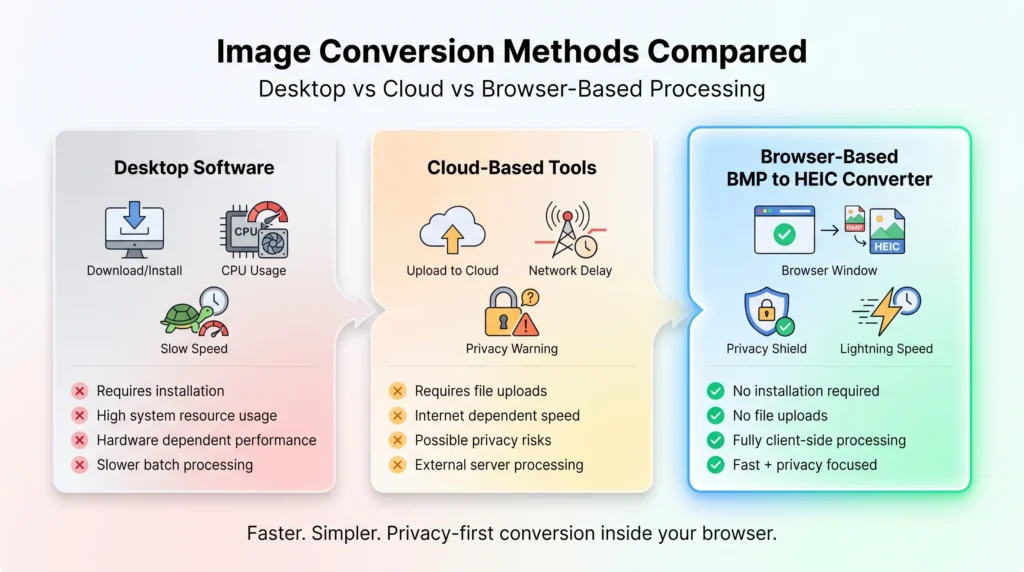
The classic desktop image conversion programs are known to consume large amounts of resources, need updates and must be installed. Performance may rely on hardware capacity and can slow processing if dealing with a lot of BMP files. This adds some more friction for users using low or mid range devices.
There are also cloud-based tools that could convert them, but they come with their own restrictions. The user should upload files to external servers first before processing, thus making it dependent on internet speed. This also has privacy implications, particularly if dealing with sensitive or personal images, as the data is temporarily stored outside of the device.
This BMP to HEIC online converter lifts both of these restrictions by handling the files within the browser, locally. No installation is required, no upload to a server is involved. Consequently, the conversion starts as soon as the file is selected, the total processing time is shortened and no network related delays will be introduced.
Users have complete control of files throughout the workflow. All operations are client side, so the tool can be fast (as in local) and convenient (as in Web). This makes it a more efficient and privacy-friendly way to overcome both conventional desktop software and cloud based converters.
SECURITY & PRIVACY
All image processing is done in the browser itself. Throughout the conversion process files are never uploaded to external servers. With this local execution model, the user’s data stays on the device, and that’s it.
Since there is no server-side processing, there is far less risk of exposing data, of data being intercepted, or of unauthorized access. There is no transfer of image content nor storage or logging of image content during or after the processing.
All temporary file data is removed from the memory after the browser session is ended or refreshed. No persistent storage, no cache or background upload.
This privacy-centric design is ideal for images that are private, academic, or professional, where confidentiality is crucial. Users have complete control over their files all the time from upload to download.
This removes common security risks associated with cloud-based converters, while still providing quick and dependable performance right in the customer’s browser.
The tool is part of a robust semantic SEO group, centered on image conversion and compression, and modern file formats optimization. It aims at high-intent and informational search queries concerning BMP to HEIC conversion and processing images in the browser.
Primary keyword alignment includes such keywords as BMP to HEIC converter, BMP file converter and HEIC image optimization tool. These keywords represent direct conversion intent from users who want to save money on file sizes or bring legacy photo formats into the modern times.
The tool additionally matches optional search layouts like convert BMP to smaller file size, decrease image size without software, and online image format converter. These are the kind of searches users are looking for when they want to optimize images quickly, without having to install any software.
Semantically, it is related to other concepts such as work flows for image compression, file format cross-platform interoperability and contemporary image formats in mobile and web environments. This will build topical authority in the image processing field.
Moreover, it can facilitate AI-powered search interpretation (SGE optimization), leveraging the fact that it handles intent-driven queries like swift image sharing, privacy-conscious image conversion, and browser-based file processing seamlessly. These associations boost visibility on both the classic search engines and AI search answers.
A BMP to HEIC converter is a program designed to convert BMP image files to HEIC format. HEIC files are compressed using advanced technologies that retain high quality without creating such large file sizes as uncompressed BMP files, so HEIC files take up less storage space and will be easier to share.
Yes, the tool is 100% free to use. No sign up, subscription or installation is required. The full functionality is accessible directly by the users via their browser.
The actual quality of the image created depends on the compression settings that are used when converting. The higher the quality setting, the more detail will be captured in the image; the lower the setting, the smaller the file size. The system is engineered to provide a balanced output that can be used for most practical applications.
No, all processing is done locally within your browser. Files are never uploaded to external servers, meaning your data is private, and fully in your control throughout the entire process.
Yes. The tool can also convert multiple BMP files in a batch mode. The conversion of each file is done separately to provide uniform output quality across all the conversions.
Yes. The converter supports most of the current mobile browsers. It won't need any installation or downloading of any app, and will be accessible across smartphones and tablets.
BMP files are large and are uncompressed, meaning that they are not efficient for storage and sharing. The adoption of HEIC format will greatly reduce the burden of uploading, transferring or archiving images in workflows without compromising the quality of images.
No other software is necessary. All conversion operations are done in the browser, meaning that the user will not have to install any application or plugin to finish the tasks.
Conclusion
Transform your BMPs into optimized HEIC format in a flash – no installation, account or upload required. It’s created to convert images quickly and privately right within your browser, ensuring you have complete control over every step of the process.
If the BMP isn’t small, it can slow down the storage and sharing process, as well as workflow. Converted to HEIC format files are smaller, have good image quality and are easier to manage across devices, platforms and applications.
The system is designed to be both fast and easy to use. Single images can be processed or multiple files can be batch converted in one session, and results can be downloaded instantaneously, rather than waiting for server processing.
Simplify image handling, maximize storage space and enhance the speed of transfers in seconds with a browser-based approach that removes all the unnecessary complexity.
Convert Now