
BMP to SVG Converter
Convert bitmap BMP images to scalable vector SVG format — perfect for logos, icons, and graphics
Drop BMP images here
Drag & drop or click to browse (max 20MB per file)
Upload BMP images and click Convert to get scalable SVG files.
BMP to SVG Converter Online Free for Instant Browser Based image conversion
Introduction
BMP to SVG converter is a web-based utility that converts BMP to SVG format in seconds. It can be used to convert BMP files to SVG without downloading any software or uploading them to other servers. Everything happens right in the browser, making it fast, private and efficient.
It is designed for those workers who often have to work on images in any format and require a swift and secure tool to convert the images from raster to scalable vector format. This tool eliminates the typical hassle of conventional software if you’re looking for a free convert bmp to svg online solution. No registration, no file upload delay, no need to rely on heavy, desktop application.
Users don’t have to use the outdated workflows, rather they can drag and drop BMP files and receive the SVG output almost instantly. This way, designers can reuse structure in UI projects, students can get assignments done a bit quicker, and freelancers can work on several files without having to switch tools. All the operations remain within the browser, minimising privacy risk and enhancing speed.
Existing conversion approaches include software installation or uploading files to a third party system. These methods reduce productivity and add to the complexity. This bmp to svg converter no upload system, on the other hand, guarantees that files remain on your gadget during processing.
The outcome is a more streamlined workflow, in which image conversion is no longer a multi-step process. Users obtain scalable SVG output which is much easier to edit, resize and incorporate into design and development projects. If you are working with bitmap images regularly, this is a solution that will remove the need to work manually and ensure a clear automated process that is quick and consistent.
Trust Badges
Fully 100% browser-based processing, no file upload, guarantees maximum protection of your files and increases your processing speed. This tool performs image conversion on the client-side with secure handling of the raster images, that is to say, your BMP files never leave your device! No registration, no watermark and free to access.
How It Works
This BMP to SVG converter is a simple browser-based process; it is designed to be fast and accurate. Does not require install or upload, and works without any external processing, thanks to the client-side image conversion technology.
Step 1: Import BMP files directly to the tool. Multiple images can be dragged and dropped or manually selected from your device. For processing batch images, the system enables you to process multiple images in a single session without having to restart the workflow.
Step 2: Each bitmap image is automatically read by the tool, and is set ready for converting to vector. At this stage, it is an image processing system that works in real time in the browser without requiring communication with an external server. This helps you maintain the privacy and security of your files.
Step 3: To start the transformation, click on the convert button. It transforms each of the BMP files to scalable vector graphics format without altering the visual structure. This helps keep the output SVG clear on varying screen sizes and resolutions.
Step 4: Download your result in a flash. Each SVG can be saved separately or all converted SVG files can be downloaded as a batch package. The output is light-weight, scalable and ready for design, development or documentation.
Use the tool immediately to transform images in seconds with no technicalities or manual work.
Problem Breakdown
When it comes to BMP files, many users face slow and outdated image workflows. Most of the time when people type the term “fastest way to convert bmp to svg files” into their search engine, they will find a tool that still requires them to upload, install or manually perform steps that slow conversion down.
The basic problem begins with format restrictions. BMP is a bitmapped format, not suitable for today’s digital applications. As users attempt to resize or reuse these images for design projects, quality soon deteriorates. This adds additional work – particularly when trying to generate a bitmap to svg lossless conversion.
The additional friction of traditional desktop software. Users have to install heavy applications, manage the updates and learn complex interfaces just to do a simple conversion. In many cases online tools are not much better, as they need to be downloaded and waiting time and privacy issues are also present.
This can pose a productivity hurdle for professionals or freelance workers. Each additional step will delay delivery timetables. Limits or paid-only batch processing is often present and users have to repeat the same process multiple times.
There are even more limitations for mobile users. There are numerous tools which are not designed to be used in the browser on smaller devices, and it is difficult to convert images when you are on the move. Consequently, the users do not have the flexibility and speed where they are most needed.
There is no direct browser based solution which makes users fall for a compromise between speed, quality and privacy. That is where modern tools for conversion come in – they eliminate uploads, minimise steps and allow instant processing on the client side.
Core Features
This BMP to SVG converter runs entirely in the browser for speed, privacy and simplicity without the need of external servers. All features are created to enhance the workflow of converting raster images, but without complicating the user experience.
Client side processing is one of the important features. Everything image transformation is performed within the browser with local resources. This facilitates secure image format transformation without uploading files, enhancing privacy and minimizing waiting times.
The tool can be used to batch process images. Users can upload multiple BMP files and convert them all in one go. It’s particularly helpful for freelance photographers and office workers who deal with big blocks of photographs and require constant output without tedious manual work.
A crucial feature is the ability to output scalable vector graphics. Converted SVG files are structured and can be scaled to any size without loss of fidelity. This renders them appropriate for design systems, UI resources, and documentation.
Optimized interface for cross-platform image conversion. It also operates flawlessly on desktop, tablet, and mobile browsers and enables users to convert files from any browser, without needing software.
Also no upload is required, hence there is no server side processing to depend on. This guarantees improved performance and removes the risk of file storage or third parties getting access to files.
Last but not least, the tool offers light-weight image conversion workflows with minimum steps. Users just upload, convert and download. No configuration complexity, no accounts and no watermark restrictions. This allows the whole process to be concentrated on speed and usability with consistent output quality.
Use Cases
Students frequently require fast image conversion for assignments, presentations or digital projects. They usually look for a free bmp to svg converter for students that doesn’t involve any installation or payment. It is a great tool for them to convert images in the browser without any technical hassles and to make the academic work faster and manageable.
Clean and scalable UI assets, branding and digital illustrations. They tend to have problems when you try to resize a raster image, causing the image to become fuzzy. The online bmp to svg converter lets designers convert bmp to svg online, meaning they can produce sharp images without worry about resolution. This will make workflows more efficient and keep the look and feel consistent across projects.
Freelance workers deal with several clients’ files and deadlines. They get delayed when they have to do manual conversion, particularly with repetitive tasks. With a convert multiple bmp images to svg workflow, they can process multiple images simultaneously in a single workflow. This helps to speed up the turnaround time and enable them to concentrate more on their creative and client work than repetitive file handling.
Legacy graphics, scanned assets or straightforward branding materials are often found in small business environments. They require a rapid, dependable, and free of charge convert bmp to svg for enterprise documents answer. This tool enables them to convert their old visuals to scalable formats for reports, websites, and marketing materials without having to pay for outsourcing.
In all of these scenarios, it eliminates complexity and substitutes it with a straight-forward, browser-based process. Consumers will benefit from quicker output, more scalable, and an easier conversion process, all across devices.
Benefits
Among the important benefits of this bmp to svg converter no signup no watermark tool is that it eliminates friction from the whole image transformation process. Users don’t have to install software, set up accounts, or navigate through limitations that impact productivity.
The main advantage is that you don’t have to upload. It is a browser based tool and files are processed locally. This will enhance privacy and decrease risk as sensitive images never depart the gadget. This makes it more secure for professionals to work with client assets.
A huge advantage is that there is always control over the outputs. The traditional tools create uneven results with respect to the load of the server or compression rules. Browser-based processing guarantees that performance is always stable and results are always the same in this scenario, particularly for converting a bitmap image to a scalable format.
Time is also a very important factor. No upload queues and no server processing delays lead to nearly instant transformation. This is particularly handy for time-sensitive tasks that require the processing of multiple files.
It also offers scalable output formats, meaning that the SVG files can be scaled without loss of quality. This is crucial for designers, developers, and marketers looking for versatile resources across various platforms.
Last but not least, accessibility is a big factor. The tool is browser based, which means it’s compatible with desktops, tablets and mobile phones. No OS or hardware requirements.
The overall design of the system is to provide a single, fast, secure, and private conversion experience for both personal and business users that eliminates slow, disjointed workflows.
Comparison
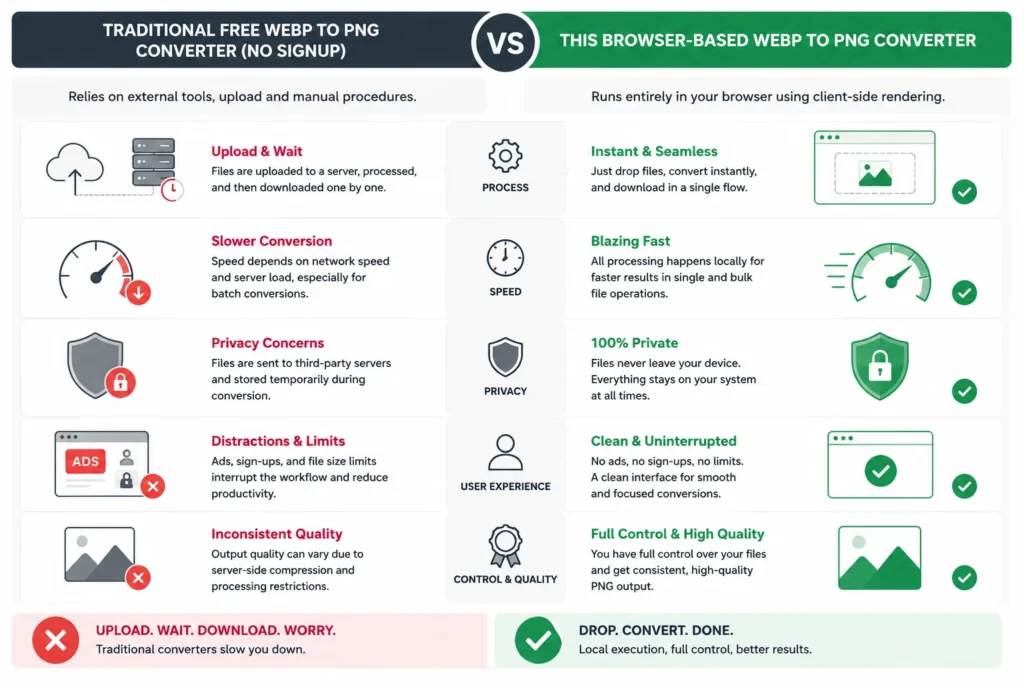
The conventional BMP to SVG conversion techniques are primarily dependent on desktop software or online services that require uploading images. With the traditional method, users need to install image processing software, import files, set export options and convert images one by one. This does not only form the various steps but also takes up system resources and slows down the workflow.
A browser based bmp to svg converter, however, eliminates the need for installation and set up. Users can begin converting right away, without downloading any software. This cuts down set up time from minutes or hours to seconds alone.
There are also significant differences when it comes to speed. Local hardware performance or server-side queues are typically used with traditional tools. If the system is slow or overloaded, conversion will be delayed. This tool processes the bmp to svg format in real time, which is much more efficient than the fastest way to convert bmp to svg.
The privacy aspect is also very crucial. There’s desktop software that stores files on the local machine, and then there’s all of the online tools that need to be uploaded to an external server. This adds to the exposure of sensitive images. When using a Browser Based conversion system, it will not upload in any way, keeping files on the user’s device while the conversion is taking place.
Cost is another consideration. Many traditional tools are licensed, or only allow batch processing under higher plans. This tool eliminates these limitations and offers unlimited access without the need for subscriptions or hidden charges.
Last, there is a huge variation in usability. Traditional software can have complicated user interfaces and technical configurations. This tool on the other hand, has a simple upload to convert to download process, which is suitable for all levels of users ranging from beginners to professionals.
In conclusion, the browser-based method is faster, more private, more accessible, and simpler than the traditional ways, making it a more convenient option for today’s image conversion needs.
This bmp to svg converter is designed to cater for various search intents regarding raster image processing and vector output generation. However, today’s users are looking for more than just conversion – they want flexibility, privacy and performance.
Among the most critical semantic spaces addressed by this tool is the semantic space of conversion from a raster image. The BMP file format is an uncompressed bitmap format and is not good for scaling or for use in modern design workflows. They can be saved as scalable vector graphics output providing flexibility in web design, UI development, and digital publishing.
Another important Semantic Layer is Browser based image converter functionality. Rather than using desktop applications, this is based on client-side image processing. This means all operations are carried out locally, enhancing performance and reducing reliance on external servers.
The system does not even allow to upload the image conversion, which is one of the most important search intents for privacy-conscious users. There are many professionals that seek tools that do not require the transfer of files at all, particularly when dealing with confidential or client-based resources.
Technically the tool applies a method for image format transformation in which the structure is preserved and the image data is embedded into the SVG containers. This ensures that the output is compatible with modern design workflows without manually reconstructing the output.
An additional important semantic factor is performance. Users prefer lightweight image processing tools to get quick results without straining the system. It does not require any kind of installation and it is not dependent on any servers, and that meets with the expectation.
Besides, cross-platform image converter behavior guarantees that it will not be incompatible with different devices and operating systems. Users can convert images on desktop, tablet or mobile without losing functionality.
In summary, it is a good tool for several high-benefit search intents such as speed, privacy, scalability, and accessibility, and therefore could be a good choice for topical authority for image conversion queries.
Technical Overview
This BMP to SVG converter utilizes client side image converting architecture, meaning that all the raster image to SVG conversion is performed directly in the browser, without relying on a server. The system reads the image data of bitmap images, renders it in an HTML canvas and outputs scalable vector graphics through embedded image encoding methods.
This is different from a workflow using a traditional server as it does not require upload of files on a server and will not generate network delay. It has browser based image converter support for the latest browser engines and it works equally across all of them – Chrome, Edge, Safari, and Firefox.
The conversion pipeline is not about heavy vector tracing, but mostly about image format conversion. This guarantees an extremely quick execution speed and maintains the visual fidelity by incorporating image data within the structure of the SVG. It is still output scalable and lightweight, ready for web deployments, UI assets and documentation workflows.
Additionally, the tool employs low resource consuming image processing techniques that allow to operate on low end devices with high performance. This can be used for cross platform image conversion – desktop as well as mobile browsers.
The technical design itself aims at speed, compatibility and simplicity and at the same time the stable output generation in order to be used in the daily conversion process.
Trust and Safety
This bmp to svg converter no upload required system has the privacy first architecture. The Image Processing is done locally within the user’s browser, meaning that no file is sent to an external server anywhere during the conversion process.
The tool works on clients’ file processing and the user retains control of the data. Pictures are only temporarily stored in memory for the sole purpose of transforming the picture and are never saved, logged, or shared outside of the memory store. This removes typical dangers of third-party upload tools.
The system also does not require the creation of accounts, logins or data tracking. This minimizes exposure and provides a hygienic and anonymous environment for use by all users.
The lack of the server communication greatly diminishes attack surfaces and makes it a safer tool to use for handling sensitive or personal images.
Moreover, outputs are not watermarked or processed using hidden layers. The users get clean SVG files which are created directly from the input images with no changes apart from format conversion.
The tool’s primary focus is to offer secure image format conversion while maintaining complete transparency, allowing users to convert their files with confidence, knowing their privacy and data integrity are upheld.
This is one of several image processing tools that are intended to facilitate and assist a variety of conversion processes. Different Users who are working with different types of files can extend their workflow using related tools for optimized output using different formats.
For instance, a user who has to work with JPEG files can convert jpg to png free of charge, and switch between lossy and lossless format for better editing possibilities. In the same way, for the handling of modern web formats, an image compression tool can be used to compress the images to small sizes without compromising their clarity and appearance to boost web performance.
For those who want to resize images, there is also a resize images online free tool, allowing users to modify the image size before or after conversion if needed. This is particularly helpful for design systems and responsive layouts.
For modern web optimization, there is a webp to jpg converter online tool to convert them into common formats to ensure compatibility with platforms and browsers.
Supportive articles also contribute to an increase in understanding and efficiency in the workflow. For instance, guides such as optimizing images for the web for its performance tell the reader how the choice of format can affect website speed, and raster vs vector graphics tells the reader why they should opt for SVGs for their scalable design projects.
These internal resources work together to form an end-to-end workflow system for image processing in various formats, devices and use cases.
Conclusion
The bmp to svg converter is a fast, secure and 100% browser-based tool to convert bmp to svg. It eliminates all installation, uploading and complicated configuration, and lets users to finish conversions in seconds.
This bmp to svg converter is useful for any designer, student, freelancer or business user in making their workflow easier and more productive. It offers a practical alternative to traditional tools that depend upon slow or restrictive processes, provides client-side processing, and supports batch.
Take advantage of the bmp to svg converter right away and instantly convert your images while keeping quality and making the entire conversion process streamlined, all within your browser.
It is a tool that supports converting images in mobile browsers without installing. It processes images in the browser, so it allows you to upload and convert BMP files right from your phone. This makes it great for quick edits and on the move workflows.
Yes, the conversion retains visual layout using rasterization within the browser. BMP is a bitmap format, while SVG remains vector-based, allowing it to go up and down with regards to size and not lose any pixelation in environments that support it.
Yes, it is entirely free without any signup. You can convert any type of file in a flash without subscribing or concealed limits hence it is the ideal apparatus for individual and expert use.
Yes, it is client side file processing so your images are not uploaded to any server. With all conversions happening locally in your browser, it offers a level of privacy and security.
Yes, batch processing is supported. You can upload several bitmap images and convert them in one go, saving a lot of time for workflows on large amounts of documents.
Lorem ipsum dol
SVG is a vector graphics format, whereas BMP is a raster format. SVG can be resized without losing quality and is better suited for web, user interface, and responsive design.
or sit amet, consectetur adipiscing elit. Ut elit tellus, luctus nec ullamcorper mattis, pulvinar dapibus leo.
No installation is required. You can start converting directly in your browser without having to download any application, everything is powered from the cloud.
The matter is that the exported SVG files are completely clean without any branding. You obtain the raw converted results bare of any watermarks or alterations.