
choose files or drag & drop
PDF files (any size, browser limits apply)
no PDFs added — use drop zone above
Merge PDF files online instantly in browser. No upload, no signup.
Introduction
Users frequently require to merge several PDF files into one for work, study or for delivery to their clients. The tools available to date require an upload to a remote server, which raises privacy issues, the delay of the upload and a reliance on the speed of the internet. The modern PDF Merger Tool tackles this by processing PDFs completely within the browser, without requiring the upload of files and retaining complete control of data.
This method is “client-side processing,” which means that all PDF files are processed directly on the user’s device. No document is ever sent to a server; at no point. This means that sensitive documents, like contracts, invoices, academic notes and business reports are kept fully private. This will substantially decrease risk from conventional web based PDF tools that store or process files away from the web.
Another significant factor is speed. Upload time and processing on queues can cause large files or multiple PDF files to cause server-based systems to slow down. With a PDF merging tool that is web-based, this is no longer a problem. Files are read on the fly, processed and merged without waiting for external computations. It enhances workflow efficiency particularly when working with large documents.
The tool can also be used to order the files to be merged so that they can be freely reordered. Users can organize PDFs in the precise order they want them in, and can drag and drop them to the correct positions to create a logical sequence. This is helpful when preparing a report, presentation, or multi-section document where the order is important.
The PDF Merger Tool does not require signing up for an account, software installation, or cloud dependency, unlike traditional solutions. All functionality is implemented in real time inside the browser, without any setup hassles across devices. This is ideal for businesses, professionals, and students who require document processing without technical hurdles.
In general, a PDF merger that is done via the web provides a balance of privacy and control along with speed that is not offered by the older upload-based PDF merger systems. It makes document management simple and maintains end-user data ownership. It is a more efficient and safe way to manage several PDF files every day.
Fuse PDF files together without any uploads, no privacy violation, and in your browser!
Trust Layer
The PDF Merger Tool has a clear focus on privacy and privacy protection: All processing takes place locally in the user’s browser. This client-server approach guarantees that PDF documents remain on the client’s machine throughout the process. The process does not involve sending documents to remote servers for printing, instead this process does not require an input/output transfer of data.
No file storage, no cloud retention and no third-party access, as files are processed in-memory, via browser-based execution. The PDFs are loaded into the browser, analyzed and merged temporarily, then discarded as soon as the browser session is finished. This decreases the chances of sensitive information like legal contracts, financial records, and personal files being exposed.
Security is enhanced by using browser based processing that’s encryption safe. No backend server is involved in this process, hence there is no place to intercept data leakage or unauthorized access. All processes take place within the user’s local environment, which greatly enhances confidentiality, as opposed to upload-based systems.
This is in line with a recent shift in privacy expectations, whereby users expect complete control over their data. This eliminates the need for external infrastructure and prevents the typical risks of cloud storage like unintentional retention or unauthorized processing.
You can use this PDF Merger Tool without any worries, as it won’t leave any of your files anywhere on the outside, it won’t run files on any other devices, and it will store all files on your own device.
How It Works
The PDF Merger Tool uses a simple pipeline for processing PDFs, processing is executed on the client side, inside the browser. This makes it very fast, very private, and not relying on other servers.
The first step is to upload or drag and drop several PDF files to the tool. These files are loaded directly into the browser memory, and not transmitted to any server. This step is setting up the local processing environment.
Then, the PDF files are individually parsed using a built-in PDF browser based PDF engine. The system extracts structure from the document, extracts pages and prepares them for merging. At this point, no file data is stored externally and all activities are limited to your device.
Once you’ve been able to get them into a list, you can reorder them in the order you want. This step is essential to ensure documents are logical, particularly for reports, presentations and multi-section PDFs. Full control over arrangement with drag and drop interface.
Upon completion of ordering, the merge starts. The tool merges all pages extracted in a single PDF file in memory. This means it is quick and there is no duplication of files.
Lastly, the combined document is created and you can download it. In your browser, the output file is created in real time and can be downloaded directly to your device.
Start merging PDFs today; upload files and manage the entire process in real-time.
Problem Breakdown
PDF combines are a frequent source of tedious user frustration. The main problem starts with fragmentation. A lot of times, files are generated using different tools, stored in different places, and utilized across numerous platforms – manual consolidation is time-consuming and prone to mistakes.
Older PDF merging tools make it even more complicated because of the need to upload PDF files. This adds Internet speed, server queue, and file size restrictions. When working with large PDFs, you may need to wait several minutes before any processing occurs, delaying time-critical tasks such as reporting, submissions and client deliveries.
Another key issue is privacy. Files uploaded to external servers will not be under the control of the user directly. Sensitive information like contracts, financial documents, academic records, and other personal or important documents might be temporarily stored or processed outside the user’s environment. This raises concerns about data security and privacy.
The majority of current systems lack real-time control as well. It is difficult for users to reorder pages and adjust the order of the file before merging, which causes document structure to be incorrect and it takes more processing cycles. This can waste time and lead to less efficient production.
Also, numerous tools have limitations in terms of size of files, usage or even the need for an account. These friction points halt the flow of tasks and make simple tasks unnecessarily complicated.
A PDF Merger Tool for the Browser negates this problem by eliminating uploads, shortens processing times and gives complete local control. It addresses the core problems of workflow, namely speed, privacy and structural control, in one system.
Get a new PDF in your browser and simplify your document workflow without having to upload or limit anything.
Core Features
The PDF Merger Tool features a client-side processing architecture which focuses on speed, privacy and control. Each feature is geared to be used directly within the browser, without uploading anything to external servers.
One of the key functions is drag and drop file management. Anyone can upload several PDF documents and reorder them in precisely the order desired prior to being combined. It guarantees the accuracy of the document structure without repeating the processing.
In-Browser PDF parsing is another important feature. The tool can interpret and read the structure and pages of a PDF file in the local system, without sending it to the cloud for processing. This lowers latency, and hence enhances performance in the case of large files.
The merge engine is in-memory based, meaning that it enables the combination of several PDFs into one without delay. This prevents duplicate files and makes the best use of resources in the browser.
The tool also offers real time statistics of the files, which include the number of files and page count for all the files prior to merging. This lets the users ensure the size and structure of the documents before the final output.
The final merged PDF is generated automatically in the built-in secure download system, so that the user can save the content directly to their device without the need to save to an intermediate location or create an account.
Instantly combine PDFs with full control over the output quality, structure and order of the combined file, all within your browser.
Use Cases
Numerous real world document processing scenarios require merging multiple PDF files into one and structured PDF.The PDF Merger Tool can be used to merge multiple PDF files to one and structured PDF for various real world document workflows.
Students use it to compile lecture notes, assignments and research papers into organized study packs. They have the ability to compile a single document to be edited or submitted, rather than handling multiple files.
Designers and creative individuals have been able to export PDFs like portfolios, mockups and client presentations and put them together in a structured showcase. This will keep the document flow neat and professional when sharing work with clients.
Developers tend to combine API documentation, technical guides, and project files into one reference document. This makes it easier to read and less cumbersome to have to switch between several files while developing.
It’s a tool for business professionals to aggregate invoices, contracts, and reports into single records for accounting and client management. This helps to maintain documentation and enhances organizational efficiency.
The advantage to freelancers is combining deliverables, proposals, and revisions into one client-ready PDF for smooth communication and presentation.
Use the tool when downloading, merging and converting PDFs in the browser without limits of file size and no need to create an account.
Benefits
The biggest advantage of the PDF Merger Tool is the change from server-based processing to a client-based process. This eliminates the typical delays involved in uploads, queuing and downloading processed results. Changes are made in real time within the browser and directly affect performance within the browser when performing normal document tasks.
Fastness is a tremendous benefit. The processing of files takes place locally; uploading or downloading data to a remote server does not require any network delay. The processing of large PDFs is more efficient, as it is distributed to the user’s device rather than a centralized server.
Another important benefit is privacy. The documents never leave the user’s device, which ensures that private information like financial transactions, contracts, academic work or internal reports are completely in the control of the user. No storage, logging or access risk to servers, no third party access.
Direct File Management provides a great deal of control. There are no system limitations for users to reorder, adjust and manage PDFs before they can be merged. This will lead to a more consistent and stable workflow, particularly for documents with an established order, like a flowchart.
Other features of the tool include the elimination of dependency barriers like account creation, subscription restrictions, or file size restrictions often implemented by cloud-based tools. This will make it more accessible for the individual and in knowledge sharing without working against the grain.
Begin implementing a solution that focuses on speed, privacy and complete user control by combining PDFs instantly in the browser, without uploading or restrictions.
Comparison
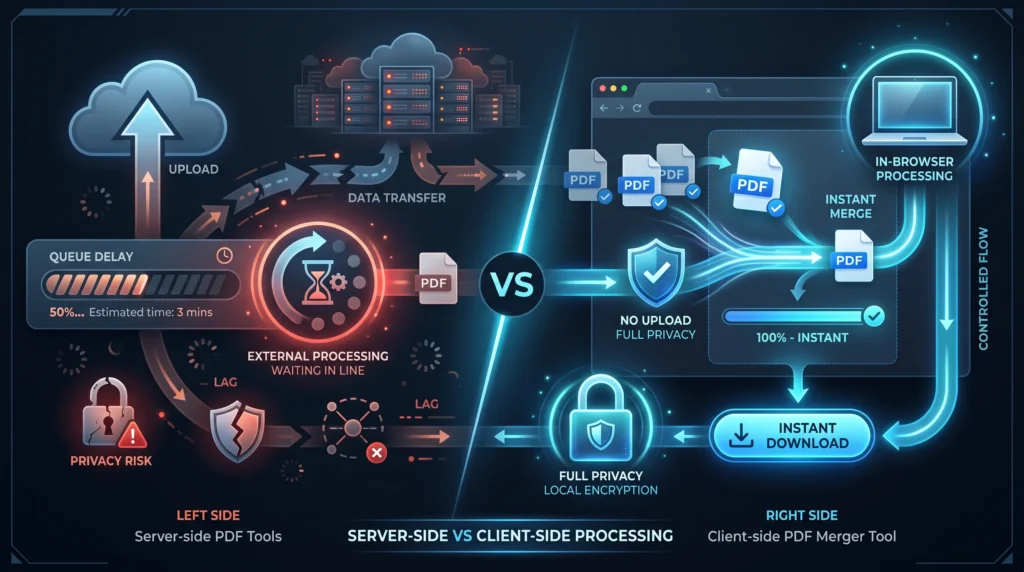
Most PDF tools are “server side” solutions that require users to upload PDF to external systems to merge them. This creates a delay of upload time, time spent in the queue and download retrieval time. It also causes reliance on the stability of the internet as well as the performance of external systems.
A client-side PDF Merger Tool, on the other hand, will handle everything within the browser itself. The files do not have to be transferred to the local memory, processed in real time, and then merged without leaving the device. This alleviates network dependence and decreases the overall processing time greatly.
The server-based tools can have restrictions, like file size limitations, usage limits, or required registration. These limitations can disrupt workflow continuity, particularly when users are dealing with large or complex documents or tasks. These barriers are removed when client side systems are used because they are executing in the user’s environment.
Server-side tools involve users entrusting external tools with private documents, which raises privacy concerns. As long as data is traveling through infrastructure remotely, it is still possible to pass through even if used in an encrypted format. This risk is completely eliminated by client-side processing, where files remain on the device and do not leave the client.
The other important distinction between them is the uniformity of their performance. Server tools may be slower in hectic times but browser-based tools will only work based on the local device capabilities and will have more consistent results.
For quicker processing, better privacy and total control over your document workflow without uploading or relying on external software or services, switch to PDF Merger Tools running in your browser.
The PDF Merger Tool is part of a larger PDF processing ecosystem that encompasses compression, splitting, conversion and optimization workflows. Today, document management is more than just about handling files. It now relies on file systems for transformation that are available in the browser and support privacy, speed, and structured output generation.
In this ecosystem, PDF merging is one of the most common operations that users perform, as they often have to work with a fragmented document from various sources. These files need to be merged into a single, structured format, which generates demand for efficient document transformation systems that are not dependent on external services.
Client-side processing is a key function in this ecosystem. Browser-native computation involves parsing, reconstructing and rendering PDF structures using local resources as opposed to server infrastructure. This is in line with the latest trend in the file processing systems that involve privacy and performance over centralized cloud execution.
Other concepts in this ecosystem are raster workflows, file streams, and document rendering pipelines. What they have in common with these systems is the desire to convert raw or fragmented digital content into usable structured formats.
The PDF Merger Tool is also conceptually integrated with other tools like PDF compression tools, image to pdf converter and splitting document systems. These can be used in combination to create a full Document Lifecycle Management environment to handle files end-to-end within the browser.
In the context of zero-install workflows, where users don’t want to have to download software or create an account before it processes, this ecosystem is becoming more relevant. It signifies a change in the direction of lightweight calculation models that are executed locally instead of in the cloud and are more accessible and controlled.
Learn how you can use browser-based PDF tools to streamline your whole PDF workflow by combining, converting and managing PDFs from the browser without having to upload them elsewhere.
Technical Overview
The PDF Merger Tool is designed to run on the client side of the browser, using modern browser APIs and in-memory file processing. The main engine is based on a JavaScript pdf manipulation library which can decode PDF document binary structures and recreate document pages in the browser.
The core of the system is a PDF processing library like PDF-lib, which allows PDF documents to be read, modified and created without the need to contact the server. Every file uploaded is turned into an ArrayBuffer and loaded into memory; its internal structure is then analyzed and broken down into separate pages.
The merge pipeline works sequentially, starting with file ingestion, parsing the PDFs, extracting pages, and reconstructing the document. Copied pages are added to a new PDF document instance – a dynamically created in-memory object. All the pages are then merged and the resulting output is then downloaded into a browser-generated object URL as a Blob binary stream.
No backend processing or API calls are making, all operations will be done within the JavaScript Runtime Environment. This provides for deterministic performance based on the client hardware and not the server availability.
Drag and drop file handling and dynamic reordering supported by DOM-based state management as well. This enables up-to-date sequencing of the files prior to merging.
This method from a systems perspective ensures no network latency, less exposure to security threats and greater transparency in processing, which is good for privacy sensitive document workflows.
Trust + Privacy
The PDF Merger Tool has been created on the basis of Zero Upload Architecture, which avoids data exposure at any point of the process. No file is sent to external servers, unlike the traditional PDF online services. Everything works within the user’s browser.
This client-side processing model guarantees that documents are always in the user’s control. Files are transferred to the browser memory area, computed in the browser, and then removed when the session is ended. None of the files are stored, backed up to the cloud, or retained in the background.
Securing-wise this setup eliminates typical security concerns like data persistence, unauthorized access, and server interception. With no network transfer, important files like contracts, financial records, and personal files never leave the device.
It is also compatible with today’s privacy compliance expectations, in which data minimisation is a key concept. The tool eliminates the need for external processing layers, providing a bigger level of confidentiality assurance for all users.
File data remains isolated in the local session environment encrypting the file data while at runtime with browser-level execution.
Now you can trust the PDF Merger Tool because there’s no point of your files being uploaded, stored, nor shared outside.
Related tools:
/pdf-splitter-tool
/pdf-compressor
/image-to-pdf-tool
/file-converter-suite
Supporting blogs:
The client-side file processing explained section covers how to use client-side file processing in a website.
The security of browser tools for files.
Conclusion
The PDF Merger Tool is a quick, secure and browser-based PDF file merger tool. It eliminates the need for uploads and server dependency, providing enhanced privacy, increased speed and full control over document processing from the user.
All operations happen locally in the browser without registration and file limits, so that users can merge, reorder, and download PDFs instantly. This is ideal for the students, professionals, and companies processing confidential and high-volume documents.
The tool is designed for real-time workflows where efficiency and data protection are critical. It makes document management easier without losing the control of documents throughout the process.
Combine PDFs easily in the browser without having to download or upload anything.
Yes. It is a client-side processing model, so everything happens in your browser. Your files are not even sent to any external server, so this both protects your exposure risk significantly and improves the confidentiality of documents.
No. There will be no upload, storage or transmission of your files by this PDF Merger Tool. In-browser computation means everything is processed locally on your device. There is no file data left anywhere outside of the session once you close it.
It operates in a sort of limited offline mode where browser support allows. As its execution hence takes our processing into the browser itself, once the tool is loaded up basic merging can work without an internet connection. Initially loading those libraries may need connectivity.
Yes. You can drag and drop PDF files before you merge them. This tool enables complete control of the order in which files appear so that your end-document is structured exactly how you want it, suitable for reports, assignments or client docs.
By removing uploads + waiting time + external APIs you can process on the client-side. This enhances speed, strengthens privacy, and guarantees uniform performance even under pressure on the server.
Based on the fact that you use it, yes (with variations depending on your browser). Your performance is dictated by your device, not remote servers because everything processing happens locally.