
WebP to PNG Converter
Convert WebP images to lossless PNG with transparency preserved — fully client-side, batch ready
Drop WebP images here
Drag & drop or click to browse (max 20MB per file)
Upload WebP images and click Convert to get lossless PNGs with transparency.
The Fast Browser-Based Batch Processing WebP to PNG Converter Free offers a rapid and convenient method for converting WebP images to PNG format.
Introduction
Webp to png converter is a web-based image conversion software that quickly converts WebP files into high-quality PNG images without downloading or installing any software. It is operating in your browser, which means quick processing, privacy and complete control of your files.
For many people looking up how to convert webp to png online free, one of the major problems is that WebP files are adopted by most modern websites because they can be compressed, but they do not have full support on all platforms, design tools, or content management systems. This results in friction for users attempting to re-use or edit images within the workflows that are still PNG format.
This tool was designed to fill that gap. The user can simply drag and drop WebP files and instantly convert them, without having to download heavy desktop software, or upload images to external servers. All processing is done on the client side in the browser, avoiding upload delays and decreasing the risk to privacy.
This eliminates a significant hurdle in image workflow for designers, developers, marketers, and freelancers. What once involved several steps, third-party tools and waiting time, now it’s a simple in-browser action.
Prior to this solution, users relied on traditional, time-consuming, and unreliable manual conversion techniques and on external platforms. Now, conversion is instant and maintains the image quality and full transparency support.
By doing so, users can enjoy a faster, safer, and reliable experience for managing WebP files without compromising on their control over data or workflow efficiency.
Trust Badges
This webp to png converter is built in such a way that there is no need for any uploading whatsoever, which means that your files will never leave your device. Processing is all local, on the client side, with client-side conversion. No storage, no tracking, no third party file handling – complete privacy, full control over your files!
How It Works
The browser based conversion system is intended to ensure that the whole process is straightforward, rapid and self-contained within your device. No external dependency, no upload queue and no server processing for the conversion process. Everything is done directly within your browser with native rendering.
The process begins at Step 1, which involves uploading or dragging and dropping your WebP files into the tool. The system reads the file locally and immediately, without the need to send anything to a server, and without using the browser memory. This guarantees speed and privacy.
In step 2, you can view the files you have selected to convert. Multiple images can be added simultaneously, allowing for batch processing for users with extensive collections of images, such as product images, design files, or web graphics.
Step 3 is the first step of the conversion process. This tool can decode WebP images and convert them to PNG files via canvas rendering. This allows to achieve quality output and maintain transparency and integrity of images.
In step 4, the final output is provided instantaneously. Each PNG can be downloaded separately, or all of the converted images can be exported to a single ZIP file for easier management and transfer.
This workflow frees up the traditional restrictions of uploads, waiting times and external processing limits. Rather, you’re provided with an efficient conversion experience that’s direct and local, all in your browser environment.
Problem Breakdown
More than anything else, converting WebP to PNG fast remains a tough nut to crack for many users on various platforms. Many websites today use WebP, as it is great for saving space in images with minimal loss, but it is not yet widely supported in the world.
The problem begins when users attempt to use the WebP images in design applications, a CMS or older software that does not support WebP images. They don’t have a seamless process but rather have to manually change steps. The majority of solutions available will need you to upload files onto an external website or download bulky desktop applications that can take up a lot of time.
Workflow disruption is another big headache. Upload based tools create delays, particularly when handling a number of files. Each image needs to be uploaded, processed and downloaded separately. This is wasteful for those dealing with large collections of images like product catalogs, marketing materials, or design libraries.
Issues of privacy are raised too. Many users don’t like uploading their sensitive / client related images to third party image servers for format conversion. This causes hesitation and lessens the trust on regular online converters.
To top that off, many tools aren’t consistent in the quality of the output. Artifacts in the compressed result, transparency loss, or resizing problems are common issues users might encounter when converting. This results in further manual correction work and this is the complete opposite of what a converter is supposed to do.
This leaves users having to look for a remedy that is not only fast, reliable, but also does not impact privacy or quality. It’s obvious there’s a need for a tool that removes uploads, minimizes steps and provides immediate conversion in the browser without workflow interruption.
Core Features
The webp to png converter has been designed with a set of performance-oriented features that enable quick, efficient, and secure image conversion within the browser environment while ensuring user privacy. All the features are designed to minimize friction as you work with the images.
Among the key features is browser based conversion (client-side processing). This means that all decoding and rendering of the images is performed locally, with the canvas rendering engine. No external server communication, speed and security improved.
Moreover, the tool is capable of batch image processing, enabling users to batch convert multiple WebP files rather than doing it one by one. This is especially helpful for designers, marketers, and developers working with big collections of images.
One of the more important functions is that it can export PNG lossless and keeps transparency. Alpha channels are preserved during conversion so that you can maintain the visual consistency of images during format conversion. This is essential for UI elements, product images and design elements.
It features drag and drop upload, which makes it easier and quicker to select files. Without having to repeatedly use file dialogs, users can just drag images into the interface.
In terms of output flexibility, it offers the ZIP file export to save all the converted images in a compressed file. This makes file-management and sharing easy.
The other LSI-powered features include image format conversion, canvas image rendering, WebP decoding and local file processing, all of which contribute towards a seamless and efficient conversion process.
The overall effect of these features is to eliminate complications and time-consuming tasks and to provide a uniform quality output no matter what kind of image conversion is made.
Use Cases
Depending on the user’s specific needs, the context of usage of the webp to png converter will offer unique search intent and operational needs.
If a student downloads resources, slides or research material from modern websites, he or she frequently downloads WebP images. There are still a few academic tools or presentation platforms that don’t fully support the WebP format. In such scenarios, students turn to search queries such as convert webp to png online free to swiftly convert images for their tasks, bypassing the need for software installation and technical procedures. The end outcome is a seamless educational process without compatibility concerns.
When working as a freelancer and designing websites or giving work to the client, one often has to work with several image formats simultaneously. If they have to work under tight deadlines, they employ methods such as a convert multiple webp files at once workflow to deal with batches of pictures in one go. This eliminates repetitive manual work and assures timely delivery of projects without having to sacrifice the quality of output.
When a marketer is creating campaigns or ads creatives, he or she may want to quickly make format changes for web assets. When different platforms require different image standards, they often convert formats such as webp to jpg using a webp to jpg converter free online. This enables the user to optimally use the assets for uploading without delays, on various channels.
For a developer that has to deal with UI assets or web optimization tasks, they need structured batch conversion pipelines. Usually they look up a batch webp to png converter on the web and outsource the embedding of a fast image conversion to the development process, most often when dealing with large libraries of images or preparing production versions.
All of these are actual use-cases where speed, format flexibility and batch processing directly affect productivity and workflow efficiency.
Benefits
The major benefit of this tool is that it can convert webp images without compromising the quality with complete control over the processing environment. This will compress images locally, within the browser, unlike the traditional converters, which compress them on the server, thus maintaining the integrity of the images from the beginning to the end.
One of the most crucial pros is lossless output preservation. The canvas-based rendering engine preserves transparency, sharpness and pixel accuracy when WebP images are converted to PNG format. This is particularly critical for design assets, UI components, and product visuals that cannot be compromised on quality degradation.
Another important advantage is the speed of workflow. The user is no longer required to upload files, wait for files in queues, and download individual files from different file servers. Rather, conversion occurs in real time, which helps to save a lot of time in completing tasks and boosts productivity.
There is also a high level of privacy. All the processing takes place client-side, so the images never leave the user’s device. This removes any worry about how personal information is being stored, analyzed or reused by third party services.
Additionally, the tool allows batch processing, enabling the conversion of multiple images at once. This is especially beneficial for workers who work with massive amounts of data, saving them time and effort from doing the same process repeatedly.
Lastly, the tool provides uniformity in all files. The conversion logic is consistent, ensuring that the resulting PNG images are always of the same quality and free from unexpected artifacts, whether you’re converting a single image or a batch of many.
All of these advantages combined make the tool not only a converter, but a reliable tool for the enhancement of the modern workflows in the field of image handling.
Comparison
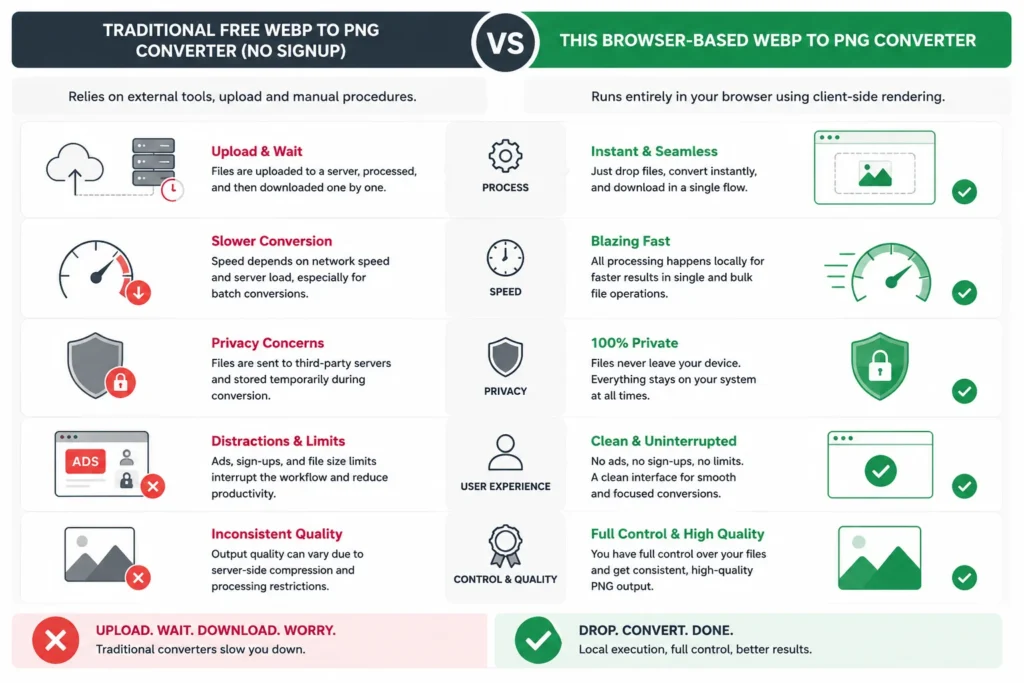
A traditional free webp to png converter no signup process relies on the external tool, upload and manual procedures. First, users upload files to a server, wait for them to be processed and then download them one by one. This adds delays particularly when dealing with several images. It also raises privacy issues as files are temporarily placed on third-party servers whilst they are being converted. Many times, the output quality is irregular, as a result of compression handling or server-side restrictions.
On the other hand, this browser-based tool eliminates other dependencies of it. The entire conversion process is done onsite, within the user’s browser, using client-side rendering. No account creation, no waiting queue, no uploading. Users just drop files, convert instantly and download the results as a single flow.
Another great disparity is speed. Network speed and server load are factors that can affect the speed of traditional tools with batch conversions. This tool processes everything locally, and is much faster for single and bulk file operations.
The nature of privacy also changes radically. With older workflows, images need to be removed from the device for processing. In this case, files are never exposed to the process since they stay on the user’s system all the time.
On the user experience side, traditional converters can be intrusive with ads, sign-ups or file caps. This tool takes advantage of direct communication without any interruptions, which is better for business and time sensitive communications.
The trend is evident; it moves towards local execution, without dependence on uploads, with full control of files and output quality.
The Browser Based WebP image converter is revolutionizing the way that image processing works on the Web. This approach to image processing avoids the need for remote servers and can take advantage of the features of modern browsers: it will use JavaScript, canvas rendering and native image decoding APIs to do the work. The approach is an example of a larger trend to move performance and privacy to the client-side device.
WebP is a new modern image format, optimized for compression. But its use isn’t consistent on every platform. There are still a lot of legacy systems, design tools, and CMS environments that rely on PNG or JPG format. This gives rise to a constant need of fast, reliable and multi-workflow format conversion tools.
To overcome this limitation, a browser-based converter is developed that totally removes the need for using the server. The browser uses built-in rendering engines to decode WebP images, and canvas-based export functions to convert them to PNG format, instead of uploading the images. This means that transparency, resolution and pixel accuracy will not be disrupted by external processing.
This also helps to increase scalability. No limitation on the size of the file to be processed other than the memory of the browser, no file size throttling, no queue of files to be processed and no server load limitation. Batch processing logic allows processing of multiple files efficiently.
Semantically, it is related to various topics including image format conversion, client side processing, WebP decoding, PNG export quality and local file handling. These signals collectively create topical authority for contemporary image conversion processes.
With the continued growth of web applications, browser-embedded tools are becoming the norm for lightweight, privacy-centric apps. This renders them specifically appropriate for people who prioritize speed, security and direct control of their digital properties.
Technical Overview
A webp image conversion software on the client side is based on all browser-native processing technologies, which allows fast and dependency-free image conversion. The system is based on the HTML5 Canvas API for WebP decoding and rendering to PNG at pixel level. After loading such an image into memory, it is drawn onto a canvas element, where format transformation is performed locally (i.e., there is no communication with external devices).
Access to user-selected files within the browser is handled by the FileReader and Blob APIs for file handling. This helps to use memory efficiently and allows real-time processing even in batch processing. Each conversion is done in an async manner, ensuring that the interface is responsive when under heavy load.
No server-side processing or external APIs are required. This removes latency, infrastructure dependencies and performance uniformity in all the user sessions. Everything is done within the browser so there are no limitations on the backend side, it relies on the capability of the user’s device.
Altogether, the architecture is focused on speed, reliability and local execution, ideal for users who need image format conversion without technical overheads or external processing layers, and with the least possible latency.
Trust and Safety
This tool will convert WebP files securely offline, as all of the image work will be done in the user’s browser. At no time are any files uploaded, transferred or stored on external servers during the conversion process. This removes exposure risks typically related to online file conversion tools.
The system is executed from the client so that user data is completely under local control of the device. Browser APIs are utilized for images processing in the memory, and they are instantly accessible for download after conversion. The contents of the session are not saved at the end of the session unless they are saved by the user.
This greatly diminishes privacy issues, particularly when the user is dealing with sensitive, client-specific or proprietary visual assets. No background uploads, no hidden storage mechanisms, no access to third party data.
Beyond privacy protection, the tool also prevents unnecessary network communication, thereby minimizing security risks like the possibility of files being intercepted or accessed without permission while being transferred.
The general approach of the system is to adopt a privacy-first approach, meaning that the security is provided by the architectural design, with the image conversion taking place safe and controlled inside the browser, and offline.
Internal Links
To reinforce the topicality of surrounding converters, it is linked to a larger ecosystem of image optimization tools that support various workflow types. These internal links allow users to easily navigate between conversion tasks based on their project needs.
For those who wish to swap other image formats, the JPG to PNG Converter enables users to swiftly convert from one format to the other, particularly when dealing with older image resources or edited photographs. Likewise, the PNG to WebP Converter is handy when it comes to optimizing images for web performance in today’s world while minimizing file size without compromising image quality.
The SVG to PNG Converter enables designers and developers to convert vector graphics into PNG images for use in websites and applications. This is particularly beneficial for UI kits, icons, and branding resources.
For those who want to improve overall performance, there is also the Image Compressor Tool that will reduce file sizes prior to or following the conversion process, and is great for the web optimization workflow.
These tools combine to form a fully fledged image processing system so that users can convert, optimize and manage assets all within the browser environment. This interconnected system makes workflow more efficient and all image-related tasks stay within one environment.
Conclusion
The webp to png converter is designed to simplify the process of converting image formats and ensure that the results are available in seconds, without the need for uploading or downloading files. It allows users to have complete ownership of their files and guarantees quick processing and a uniform quality of output.
From individual images to bulk assets, the tool ensures a seamless, secure, and productive workflow for you. No sign-up forms or waiting for the server; direct conversion in your browser.
For those who are looking for a quick solution to manage WebP compatibility issues, this tool is all set to take care of it within seconds.
Now, download the webp to png converter and finish image conversion in no time.
To convert WebP to PNG, simply upload the images you want to convert directly into the tool and get the processing done in your browser. Local rendering is used for the conversion, which means there's no uploads or installations. This guarantees rapid output and higher level of control of files.
Yes, the tool is 100% free. No sign-up, no subscription or hidden restrictions to convert images, making it ideal for quick and repeated use.
No. All files remain on your device, it is a client-side process. The conversion does not involve uploading or storing on a third party.
No, the tool will not affect the resolution or transparency. To preserve the visual quality, canvas-based rendering is used to produce PNG output.
Yes, it can be used to batch convert. Multiple files can be uploaded, processed in the same run and downloaded one by one or as a zip-file.
Yes, it does work on modern mobile browsers that use JavaScript and HTML5 canvas. Images can be converted, without requiring a desktop system.
The majority of common WebP images are supported. The size of the image will influence performance, but the usual image sizes will convert nicely.