
AVIF to PNG Converter
JPG · PNG · WebP · SVG · AVIF — batch convert any format, real-time preview, ZIP export, 100% client-side
Drop images anywhere
Supports JPG, PNG, WebP, SVG, AVIF — drag & drop or click (max 25MB each)
Upload images and click Convert All
AVIF to PNG Converter Free with Batch Export & High Quality Browser Output
INTRODUCTION
The AVIF to PNG converter enables you to convert modern AVIF images to the popular PNG format right in your browser. No software downloads, no installations, no external software. It is designed for users that want quick compatibility while avoiding format limitations between tools, CMS, and design software.
Today’s most prevalent and aggravating problem is simply this. While AVIF is efficient and of good quality, it’s not yet supported fully by many platforms. It doesn’t always fit in editing tools for designers, isn’t always compatible in web building workflows for developers, and isn’t always easy to convert using less reliable online tools for marketers.
This is where this tool comes in, as it allows you to convert AVIF to PNG instantly, with nothing to install, through browser based processing. The workflow remains local with no files leaving your device, resulting in faster workflow and better privacy. Users can upload several files simultaneously, set output parameters and export all as clear PNG files or a compressed zip file.
For instance, when someone is searching for “convert avif to png online free”, they are likely seeking a rapid and hassle-free resolution that doesn’t involve signing up or downloading software. This tool is specifically engineered with that purpose in mind and provides a seamless workflow that only takes seconds and not minutes.
Prior to the existence of this kind of tool, users needed to use desktop tools to change files or upload them to external servers with unclear privacy policies. That was a slow, repetitive and hazardous operation on a sensitive asset. All of the conversion now takes place within the browser, via client-side rendering, thereby enhancing control and efficiency.
This means that AVIF to PNG is now a seamless process, without any intermediate steps or compatibility concerns, making the resulting PNG images readily available for design, development, or publication.
TRUST BADGES
No upload required. No account creation. Blank output watermark. Everything is processed locally and in the browser, by means of client-side rendering. No server dependence, all your files remain on your device from start to finish, you have complete control, speed and privacy.
HOW IT WORKS
The AVIF to PNG converter does not require any upload or external server as it performs client-side processing directly in the browser. The entire process is supposed to be straightforward, quick, and predictable even for the non-techie.
Step 1: Upload your files by clicking
Drag and drop AVIF or SVG images to the upload area or choose via a manual selection from the device. Multiple files can be converted simultaneously, providing faster batch conversion for larger workflows.
Step 2: Choose output settings
Choose PNG as your output format and optionally set image scale and image quality. These controls enable you to strike a balance between file size and clarity, depending on what you are looking to do, whether it’s web publishing or design work.
Step 3: Click convert
It begins with the conversion right inside your browser with Canvas API based rendering. Each picture is locally encoded, processed and encoded again. This means files never leave the system, and also creates less wait time due to uploading files from the servers.
Step 4: Download your results
After the processing, each image can be downloaded separately, or all images as a single zip file. This can be particularly helpful for batch workflows when multiple assets must be delivered in a single package.
PROBLEM BREAKDOWN
For most people, there isn’t a clear path to the fastest method to convert AVIF to PNG. While its use is rapidly growing for new images on the web, adoption is still uneven across Web tools, applications, and CMS. This results in a recurring process issue, forcing the users to convert images back and forth before they can utilize their images.
In many instances, users resort to desktop applications or online converters, which adds friction. Desktop tools need to be installed, updated, and use system resources. File uploads are necessary for many online tools, slowing down the process and posing privacy concerns with client files or commercial projects. Other tools are also not able to handle batch processing and users need to convert images one by one.
Quality variation is another common problem. Some images may become soft and lose color fidelity or resolution control during conversion, particularly if compression is not explicitly indicated to the user. This can be a big issue for designers, developers, and marketers who seek consistent output quality.
The true inefficiency comes into play when users are trying to process multiple AVIF files simultaneously. Manual conversion becomes a time-consuming process of repeated uploads and downloads and renaming files. This disrupts workflow and affects production pipelines.
Users need to have the ability to upload directly to a browser, to work in batches and to control output quality. The task is straightforward: convert AVIF files to PNG images without wasting time, or adding any unnecessary steps.
CORE FEATURES
This AVIF to PNG converter focuses on practical features to address workflow challenges, not create unnecessary complexity. All features are geared towards fast speed, control and browser based runs.
The most crucial ability is image quality control. Depending on the use case, users can adjust the output clarity. Whether you want to create high resolution design assets or images for the Web that are small in size, the tool can give you the fine control you need over the final PNG image. This helps ensure the consistency of visual elements across platforms.
Another fundamental functionality is batch processing. Users are no longer required to convert individual images, as they can upload multiple AVIF files at once and process these images in a single workflow. This is a huge help for manual tasks and particularly beneficial to developers, designers, and content teams dealing with a massive number of images.
The tool offers flexible scaling, too. Users can resize images during conversion without the need for any separate software. Great for responsive web, social or print designs.
100% of processing is done on the client side via client-side rendering. This translates to no uploading, no server requirements and quicker execution. It also enhances privacy as the files never leave the user’s device.
Last but not least, ZIP export ensures easy delivery. All converted PNG files can be exported in one compressed file, rather than downloading them one-by-one.
These all contribute to an efficient conversion process that removes the need to use disparate tools and is all under one browser-based system.
USE CASES
There are various use cases for the AVIF to PNG converter and each of them is having a very clear search intent where speed, quality and convenience are the key factors.
In the course of an assignment, presentation or research project, students often require rapid image conversion. If they find the query “convert avif to png online free”, they are generally looking for a tool which does not require any set up or sign up. By using this converter, they will be able to upload files and receive PNG images ready to use in seconds, which will make their academic work smoother and more efficient.
For campaigns, landing pages or even just social media posts, marketers often have a collection of image assets. They tend to search for a “convert multiple avif files at once” option so that they can save themselves from repetitive manual work. They can use batch processing with this tool, which allows them to convert a range of images in a single batch and saves a lot of time for content production.
Freelancers need flexible tools that can be used without subscription or software installation. They tend to look for “free avif to png converter no signup” because deadlines are an integral part of a client project. This is a tool to help with that need – it provides direct conversion with ZIP export, so that you can simply send the file.
When modern image formats are used within web projects, developers are faced with issues around compatibility. They usually look for “avif image converter batch processing” when they need to get images ready for the production environment. It is suitable for frontend workflows and optimization pipelines, as can be used for bulk conversion and consistent output.
In all these cases the key is to have the ability to convert AVIF files to PNG format in a quick and reliable manner, without stepping in and out of the conversion process or running into technical hurdles.
BENEFITS
A key benefit of this tool is that you can convert AVIF images with no loss in quality, and users have complete control over the output process. This is different than the traditional converter as there is no automatic compression or unpredictable encoding; users can control quality settings directly prior to export.
Images are first decoded and then re-encoded to the local machine since they are processed in the browser with client-side rendering. This decreases reliance upon outside servers and removes delays due to uploads. It also provides more direct handling of the original image data, ensuring greater consistency in output results.
Another big plus is consistency of visual performance. For the user, it is possible to set the scaling and compression levels as per their use case. For instance, a designer working on the UI assets may focus on sharpness, while a marketer will focus on getting the file sizes smaller, without having to manually edit each one of the images. This is important flexibility so that the output is in line with the actual production requirements rather than the conversion default.
Batch processing is another added benefit of efficiency. Users can batch process multiple AVIF images in one workflow, rather than performing the same conversion steps for each image. This saves considerable time in running operations and boosts productivity, particularly for teams with extensive visual libraries.
In addition, privacy is a structural benefit. There is no reliance on an external storage or upload pipelines as the files never actually leave the device. This decreases risk and boosts confidence while handling sensitive or customer assets.
In terms of overall workflow, the system is about controlled and high consistency conversion versus automated compression, where accuracy and reliability is important, as opposed to automated compression.
COMPARISON
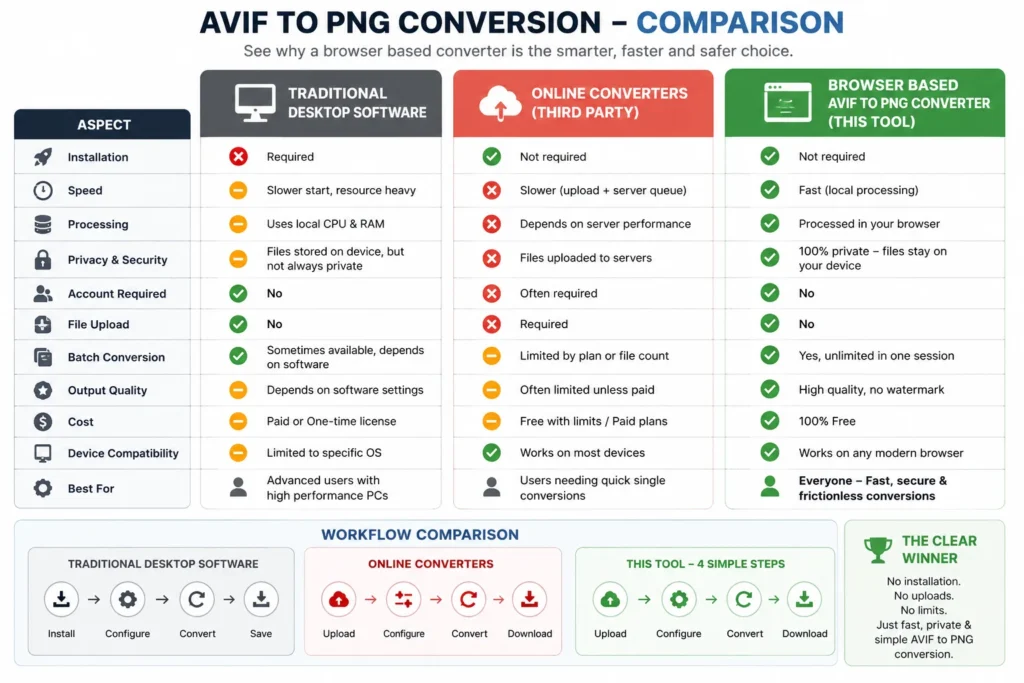
Both the conventional approaches come with certain drawbacks: desktop software tends to be resource-intensive, and outsourcing to online tools often involves proprietary, commercial platforms that require sign-ups.The traditional methods of converting AVIF to PNG are either desktop software that eats up a lot of resources or relying on third party online tools that are proprietary, commercial and require registration.
Users have to install traditional desktop software, deal with software updates and allocate system resources. It is often slow to get going and manual process of setting up is required prior to any conversion. These tools might have some high-level features, but they aren’t designed to be fast and repetitive. Sometimes batch processing is possible, but it remains dependent on the local hard ware performance and software complexity.
Removing the need for installation comes at the expense of other issues that online converters present. Most are file uploads, which slows down workflow and creates privacy issues. Users also have restrictions on the number of conversions, size of files and sometimes are even forced to create account. Many of them compromise on the quality of output or limit output in some way unless a higher level plan is paid for.
This browser based tool alleviates the dependency of installation and upload, in contrast. Each file is processed on the local end, within the browser, to increase speed and reduce the need for sending files to the outside. No sign up, no watermark, no external server delay. Batch conversion occurs in one session, making it much more efficient for repetitive conversions.
The distinction is clear from a workflow point of view. Traditional methods make the process heavy and fragmentary, this tool provides a direct 4 step process: upload, configure, convert and download. It makes AVIF to PNG conversion easy and frictionless for all, no matter your technical skill.
A browser based AVIF image converter is a new paradigm for the way modern file conversion tools work and reduces the dependence on the server-side processing to local processing within the user’s browser. As AVIF and other image formats become more popular, yet aren’t supported in all legacy systems or editing suites, this method will become more and more important.
In terms of SEO, users who are searching for browser based avif image converter have three main objectives – instant access, no installation, and secure processing. This is an indication of the frustration with the limitation of the traditional software and slow uploading in based converter software. A first architecture that fully meets this demand would be a first that relies on the client side rendering engines, like Canvas API and createImageBitmap, without any external dependency.
This model also enhances the performance perception. Conversion takes place locally which results in faster interaction cycles particularly when batch processing is involved. Images are decoded and re-encoded real-time in the browser environment rather than waiting for the server queue or until they are uploaded. It can help minimize friction in web development, content creation, and digital asset management processes.
Another key semantic layer is intent based on privacy. There are many users that want tools that never leave the device. Browser based conversion meets this requirement by design and doesn’t need any extra trust assumptions, account systems, etc. This is to give the impression of reliability of the tool when compared with traditional cloud based converters.
Besides, the shift to support multiple formats such as AVIF, PNG, JPG and SVG makes keywords relevant for more than one use case. It relates the tool to other search intent clusters like converting image formats, batch image processing, and rendering images on the client side.
In general, a browser-based AVIF image converter is more than a tool. It’s a modern workflow standard in which speed, privacy and accessibility are part and parcel of the conversion process itself and not necessarily add-on features.
TECHNICAL OVERVIEW
An AVIF image conversion tool for the client side, which is completely based on browser based processing architecture. It leverages the Canvas API and createImageBitmap to decode and render images in the user’s environment. In more complex or unsupported scenarios, FFmpeg.wasm serves as a fallback decoding layer, ensuring consistency in conversion for AVIF, SVG and modern formats.
The entire transformation takes place locally, meaning that no communication with the server is needed during the transformation lifecycle. The files are uploaded to memory, processed real-time, and converted to PNG, JPG or WebP format, which the user chooses. This way, latency is minimized and there is no need to rely on external infrastructure.
A queued execution model is used for batch processing, ensuring that each file is processed one by one to guarantee a stable performance across devices. The output is created as a Blob and can be optionally zipped with JSZip for bulk download workflows.
Technically, this architecture provides a higher level of trust signals like client side processing, local rendering of images and browser based encoding. It also provides support for modern browsers and keeps the backend dependency to a minimum for light weight execution.
TRUST AND SAFETY
It is built on the strict “privacy first” principle, with all conversions to AVIF formats being local, in the user’s browser. If the user converts AVIF files securely offline, there is no uploading, storage or transmission of images to an external server. This removes the typical dangers involved in handing over a file to a third party, including possible unauthorized access or data retention.
Being 100% client based, the tool does not need to have any user authentication, registration mechanisms or storage systems. The conversion session is only stored in memory and is automatically deleted when the page is refreshed or closed. This guarantees that at all times sensitive images are under complete control of the user.
The architecture also minimizes the risk of network based vulnerabilities, with no API calls or external upload endpoints being part of the conversion process. It’s ideal for anyone who needs to manage privacy sensitive design resources, client work, or proprietary visual content.
Besides, the offline capability of processing makes it more reliable with poor network conditions. Each user is able to work without interruption and is aware of all image transformations are carried out directly on the device.
The system has been designed with a strong emphasis on privacy, control, and transparency, providing a secure option to the conventional upload based image conversion tools.
Other image tools of interest are convert jpg to png free, png to webp converter, svg to png online and compress image online. These tools provide seamless format conversions and workflows, enabling users to switch between compression, conversion, and optimization with ease. These tools complement the avif to png converter, and address related requirements in image pipelines.
To aid in learning and SEO context, users can partner with optimize website images which explains the performance improvements that can be made by using the correct compression techniques. A handy guide is avif vs jpg guide which explains the differences between the two formats and provides guidance on which to use for particular use cases. These connections boost inbound SEO equity and lead to a full image optimization environment.
CONCLUSION
Avif to png converter is a fast, browser-based image converter with no uploads or installation. It eliminates compatibility problems and provides end-user control of format conversion within a safe environment.
Designers, developers, and marketers who deal with AVIF files will find this tool to be a lifesaver, as it saves them time and effort in handling the files and performing conversions.
Now, use the avif to png converter and convert avif to png in an instant.