
BMP to JPG Converter
Convert large BMP images to optimized JPG format — smaller files, better compatibility, 100% client-side
Drop BMP images here
Drag & drop or click to browse (max 20MB per file)
Upload BMP images, adjust quality, and click Convert to get optimized JPG files.
Add Your Heading Text Here
Introduction
A bmp to jpg converter allows user to convert large bitmap images to light weight and compatible jpg formats within the browser. It eliminates the need of any heavy desk software and slow upload based tools and helps in converting images faster and more controlled.
Designed for students, designers, freelancer, and professionals who frequently work with BMP files that are too large or not compatible with the current platforms. Users can do the whole conversion process in their browser without software or external servers.
Phrases such as convert bmp to jpg online free indicate that there is a need for quick and easy image format conversion without the hassle. Traditional tools tend to reduce the flow of work, such as uploads, logins, or through batch processing. A browser based image conversion method provides an approach that overcomes these obstacles and maintains the process lightweight.
This no upload bmp to jpg converter workflow allows users to keep complete control of files while providing quick and uniform output. BMP files are processed locally, optimized to JPG output and are ready for download within seconds. This change enhances performance and security, and decreases reliance on third-party resources.
Trust Badges
No upload required, client side processing, secure browser conversion, no sign up required, lightweight image tool.
How It Works is a UX Clarity.
This bmp to jpg converter works with the images directly on your client side image rendering, so it will remain fast and private. No server upload is involved, your bitmap images remain on your device during the entire conversion. This makes the process more secure and efficient, and also ensures that the output is of uniform quality.
The workflow is kept as simple as possible to enable conversion of images without technical knowledge or any set-up time delay. Each step is clear and has a minimum of interactions with immediate visual feedback. Automatic Handling of Bitmap processing and JPG export after files are selected.
The 1st step is to upload your BMP files.
Click or drag and drop your BMP images in the Browser window. It can read your files instantly without sending them to any server, which means you can do so without compromising privacy and with a faster initialisation.
Step 2: Select output quality option
Use settings to compress JPGs to reduce image file size and image quality. This gives you the freedom to optimize files for specific purposes, while maintaining output quality.
Step 3: Start conversion process
To start converting the raster image, click on the convert button. Each file is rendered in real time in the browser, and then converted from bitmap to JPG format by the tool.
Step 4: Download your JPG files
After converting, download individual images or batch downloaded as a zip file. Optimized output for web use, sharing and efficient storage.
Call to Action: Get started with conversion now and enjoy instant processing of your BMP files in the browser!
What is the problem | Pain Amplification
For most users, the quickest method of changing bmp to jpg isn’t always the easiest route to take. Many are still using the old desktop software, which needs installation, frequent updates and a lot of system resources. This makes the process of converting images to other formats more time-consuming and makes daily tasks more inefficient.
These are usually substituted with online tools but with their own drawbacks. Most of them need to upload files to external servers, resulting in additional waiting time and privacy concerns. When bitmap images leave the user’s device they are not under their control. Also, some platforms impose file size limits or batch processing is only available with paid versions.
These restrictions are more apparent to those who are using more than one image. Uploads and downloads for each file can be a time-consuming and unproductive process and bulk conversion not efficient. There is no lightweight and browser based image conversion service for users so they have to compromise between speed, quality, and privacy.
Without the modern bmp to jpg converter no upload required solution, users have to endure delays, unpredictable output quality and interruption in workflow. This can be a real issue when you’re under a deadline or you want to optimize a large collection of bitmap images for the Web or your business.
In-depth features | Value Communication
This bmp to jpg converter is a fast, reliable and privacy focused image conversion system that is based on new browser based image processing. It does away with reliance on external servers and offers a seamless client side conversion experience with bitmap images.
One of the basic features is client side processing, which allows all the conversion of rasters to occur within the browser. This guarantees that files don’t go out from the user’s device, boosting security and performance. Users can convert images without waiting for image to upload or wait for server queues.
High quality compression control of JPG is also supported with the tool. Users can compress the image to the desired size by changing the compression ratio. It’s helpful for web optimization, digital storage, and professional publishing work flows.
Free-lance users and office users will benefit from the support of batch processing, which enables multiple bitmap files to be converted in one go. The tool works in a single session, eliminating repetitive work when dealing with files.
Other benefits include cross platform support, fast performance and instant file preview after conversion. The tool is running in the browser, therefore, there is no need for any special installation or configurations on desktop, tablet or mobile devices.
All in all, this image format conversion software works on speed, simplicity and output uniformity with maintaining the privacy first approach for all users.
Use Cases | User Targeting
Frequently students require a free bmp to jpeg converter for students when they are submitting assignments or working on digital projects. They typically work with large bitmaps created in design software or scanned artwork, and require a fast method to convert bitmap images to JPG for upload and sharing. A tool that runs in a browser does not require any installation process, and saves the trouble and speed of the installation process, so they can complete the task without technical obstacles.
When designers need to create visuals for clients or portfolios, they often need to convert a bitmap image to a jpg without any loss of quality. They depend on precise colour reproduction and controlled compression for design integrity. This tool can be used to tweak the quality of the JPG’s without compromising the consistency of the process within the browser that allows for processing to the professional level without external software.
In educational and office settings, where speed and efficiency are paramount, a free bmp to jpg converter for students and office users becomes indispensable. Scanned BMP files are frequently converted to JPG for reports, presentations or documentation by teachers, assistants and staff. The tool saves time on repetitive conversions and boosts the efficiency of the workflow.
Freelancers who work with their clients’ projects often have to convert bmp to jpg for business paperwork. They frequently deal with several sets of pictures for marketing, branding or reporting purposes. They can run conversions batch-wise or via browser which might take less time without the need to paid software or upload sensitive files to third party platforms. This helps with productivity and safety of client information.
Deep Benefits | Persuasion Layer
The bmp to jpg converter no signup no watermark workflow eliminates some of the construction hurdles that impede regular picture conversion devices. No more sign-up, confirmation e-mail or limits on free tiers. This helps to establish a frictionless environment in which the focus remains entirely on the conversion task itself.
One of the great benefits is privacy. All processing is done on the client side within the browser and bitmap images do not leave the user’s device. This greatly diminishes risk associated with uploading sensitive or confidential visuals to external servers. It also provides complete user control of the entire image lifecycle.
Another key benefit is consistent output quality. Predictable compression is not applied to images in many traditional converters, or server side optimization is applied, which can result in distortion. This system allows users to directly control the quality setting for JPEG images, and thus produce more consistent and predictable output between different files.
An advantage is speed, too. Since there is no delay when processing, uploads and downloads are virtually instantaneous. It can process even large volume of bitmaps efficiently and can be used for time critical operations.
Lastly, cross-platform support allows users to perform conversions on any device, be it a desktop, tablet, or a mobile web browser. Such flexibility helps to facilitate the modern workflow that is no longer bound to a machine or location.
Comparison | Competitive Logic
The main distinction between the best bmp to jpg converter online tool and the traditional approaches to image processing is the way in which it manages the image processing. In the case of traditional desktop software, you need to install the software and allocate system resources as well as do manual configuration before any conversion process can start. This causes delays even in the simple conversion of a raster image.
This tool, on the other hand, is a browser only tool and doesn’t require installation. Users can instantly upload file and make conversion in a few clicks. No need to worry about software compatibility or patches, which makes the workflow more stable and accessible.
Another huge disparity is speed. Many desktop tools can consume a lot of system resources to process files locally, and many online tools involve time for uploading and processing on the server. Both the bottlenecks are eliminated by this browser-based converter, which processes the bitmap images on the client side, thus offering a faster turnaround.
Another important element is privacy. Typically, traditional online image converter tools involve uploading photos to external servers, risking the exposure of sensitive image information. This tool eliminates all of that by ensuring that none of the processing goes anywhere outside of the user’s device, so that files are never shared.
Cost and availability are also factors. Many of the more sophisticated desktop or online programs require paying for to unlock their batch processing or high quality export features. This solution is free and has no registration, no watermark and full functionality without delay.
In conclusion, users can expect a more efficient, secure, and versatile image format conversion experience than traditional methods, particularly when dealing with multiple BMP files for daily or professional purposes.
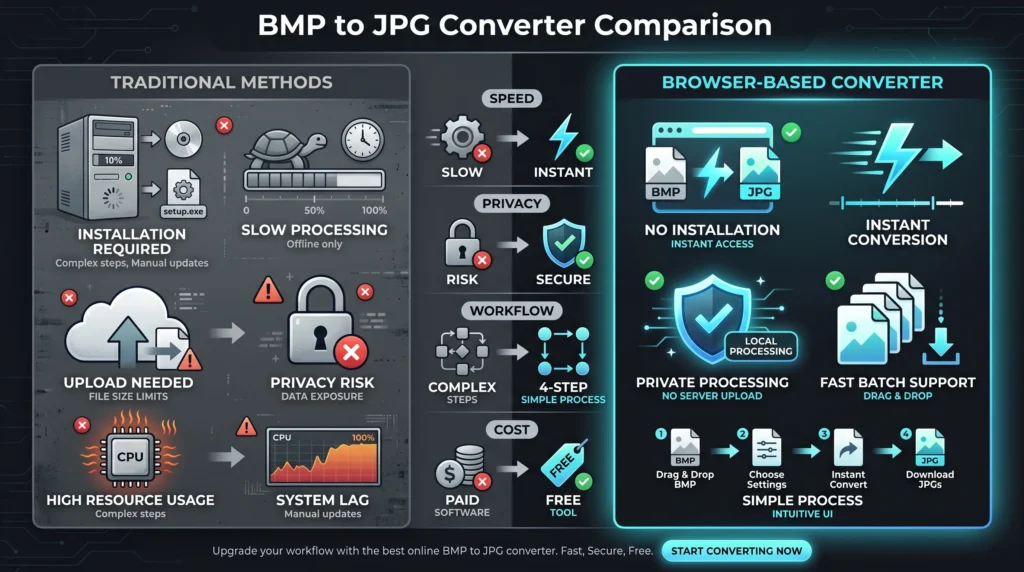
BMP to JPG converter no signup no watermark is becoming more important with the transition to lightweight privacy focused tools. Today’s workflow requires quick image conversion without all of the installation, registration and file restrictions. This Browser Based approach is straightforward and efficient enough to meet those expectations.
Technically, it’s based on bitmap rendering on the client side in the browser. This means that local raster image conversion takes place, without sending data to external servers. This allows users to reap the advantages of quicker processing times and enhanced data privacy, particularly when handling confidential or business-related images.
An essential factor is the efficiency of image format transformation. BMP files tend to be large and uncompressed, which makes them not ideal for web usage and storage optimization. Distilling them to JPEG format means they can be kept to a small file size whilst being maintained in reasonably good visual quality as the compression ratio can be controlled.
The tool also provides scalable image workflows. It is capable of processing multiple files in one session, ideal for batch image processing. It is a handy feature for freelancers, designers and office teams that are dealing with extensive collections of bitmap assets.
Further LSI concepts like image optimization workflow, cross platform tool access etc. show that it plays a vital role in today’s web based ecosystems. Helps to remove the need for heavy software, and meets the rising need for fast, secure and browser based tools for image processing, with no device restriction.This is a sort of Technical Overview of the Authority Layer.
This bmp to jpg converter is based on a full browser based image processing engine that can be used for bitmap rendering and JPG export via client side processing. All the raster image conversion is done locally, thus eliminating the need for any external servers and speeding up processing for end users.
The tool is based on HTML5 canvas based rendering to decode the BMP pixel data and reconstruct it into a compressed JPG format. In the process of changing the image format, users can set the ratio of compression, so that users can balance image quality with file size.
As all processing is done inside the browser, it can be considered a lightweight image conversion tool that is cross platform. It can be run without needing to install it, a system dependency, or an update to your browser.
The architecture allows to efficient process images in batches with consistent output. It also guarantees consistent performance across various devices, beneficial for both personal and professional workflows that demand fast image optimization.
Trust & Safety / Privacy Signals
This bmp to jpg converter is designed with privacy in mind, ensuring that all conversions take place on the user’s device. No upload conversion logic means that the bitmap images never leave the browser, thus limiting the exposure to external servers and third party storage systems.
No user accounts, no log-in or other registration required. This removes any issues with data monitoring and supplies a secure method for changing images, particularly when it involves sensitive or private records.
This eliminates the need for server-side processing, mitigating risks associated with handling files, like exposure in cloud storage or unauthorized access. Users can control the data of their image through the whole conversion procedure.
Furthermore, the light processing on the client side means that there’s no background processing or hidden data collection or transmission. This ensures that it is a secure BMP to JPEG converter that can be used in professional, academic, and personal scenarios where privacy and data integrity are paramount.
Used with other image format workflow tools to enable a complete optimization ecology. Bitmap image processing users frequently switch between various conversion requirements, depending on platform and/or project requirements.
Users can check out options such as convert png to jpg free, which can convert images with transparency to the more popular JPG format for web use. Another similar alternative is convert jpg to png free, which is very helpful when you need to preserve the image quality of your image and need transparency support.
Users may use compress jpg online free to optimize workflows and minimize file sizes without compromising visual quality. This is significant for more website loading speed and for putting away room. Likewise, free online resize image can be used to resize images for particular design or publishing requirements without compromising on quality.
If you want to try something different when it comes to the bit map handling, then convert bmp to png free is the option that you can choose. These interrelated tools provide a seamless image processing workflow, spanning formats and applications.
Conclusion
A bmp to jpg converter makes it easier for users to cope with large bitmap files by converting them to JPG images of smaller size in the browser, which are easier to handle and widely supported. It eliminates the requirement of installation, uploads, and complicated software, making the picture conversion quicker and simpler.
Client side processing affords users full control over their files with privacy and predictable output quality. It is a tool for quick and effective image format conversion, without any redundant operations, for students, designers, freelancers or professionals.
Now get started with the bmp to jpg converter and image convert in seconds with speed, privacy, and simplicity.
FAQs
Yes, you can change bmp to jpg on a mobile browser without downloading any software. The browser based image tool is compatible with the latest mobile devices and can manipulate files within your mobile phone. This guarantees rapid, full control of the bitmap images converted, and output quality / file size.
Yes, bmp to jpg converter is 100% free and does not require any sign-up. The conversion of unlimited images without any restrictions makes it perfect for quick image format conversion jobs. Also allows for batch image processing of multiple files in a single session.
Yes, bmp to jpg is compression, though under certain circumstances, it causes a slight loss of image quality. But, this tool gives you the option to control the compression ratio of JPG, to balance the image optimization workflow with clarity. This keeps the output quality high, while at the same time keeping the size of the files small.
Yes, this secure BMP to JPG Converter will work on the client side. It doesn't upload the conversion so the bitmap files never leave your device. This means that there is extensive privacy protection and no risk from external storage servers.
Yes, it is capable of batch image processing to convert multiple BMP images in a single go. This makes workflow more efficient and helps save time for freelancers and professionals who work with extensive image collections.
No, it's a browser-based image tool, no installation or updates. Just open the tool, upload your files and begin converting immediately with no system requirements.
Yes, JPG is a popular image format and is supported by many websites, applications and documents. Once converted, your files are extremely compatible and optimized for digital use and sharing.
Yes, the original resolution of your bitmap images is maintained in the conversion. Compression is only made (based on your selected quality settings) making sure that you do not end up with unwanted distortion.