
BMP to PNG Converter
Enterprise bulk converter • Web Worker parallel processing • Memory-safe • ZIP export
Drop BMP images here
or click to browse (max 20MB each, unlimited files)
Upload BMP files, click Convert
Convert BMP to PNG files.
The BMP to PNG converter is a fast and easy online tool created to convert bitmap image files into the modern PNG format instantly and reliably. It saves users from software installation, uploading and external processing systems, and enables them to do the image conversion directly within their browser environment.
This tool is optimized for speed, scalability and consistency. It processes a task efficiently, whether it involves processing one BMP file or many. It guarantees smooth performance even if multiple files are being converted simultaneously.
The key goal is to streamline image conversion processes while maintaining quality. The user can drag and drop BMP files to the interface, process them right away and download PNG file(s) one by one or in bulk. Every stage from upload to end download is designed with minimum friction.
It is particularly helpful for professionals dealing with extensive amounts of images, working with legacy bitmap files, or handling cross-platform file compatibility challenges. A quick and consistent conversion process is useful for designers, developers, students and office users alike.
One of the best attributes of this BMP to PNG converter is that it features a privacy-first design. All processing is done in the browser. No files are uploaded to external servers and no data is stored after the session. This guarantees safe handling of sensitive or even confidential image files.
The user interface is intended to be clear and efficient, with a focus on functionality and workflow. Users receive real-time processing feedback, batch support and instant output generation without unnecessary steps.
PROBLEM SECTION
Although BMP files are still widely used in legacy systems, they can cause obvious inefficiency in today’s digital workflow. They are not normally compressed, can be large, and are resource intensive, making them slow to transfer, store, and process. This adds to unnecessary friction in the environment where speed and optimization are necessary. Furthermore, many contemporary platforms, web applications, and design tools can’t natively support BMP files, resulting in compatibility issues and the need for manual conversion.
The usual methods to solve this problem are based on desktop software. These tools are useful and do provide a lot of functionality, but they take up system resources and need to be installed, and can have manual steps in their configuration. This introduces an additional layer of complexity and decreases performance for everyday tasks, particularly when converting numerous files or performing repetitive conversions.
When using online conversion tools, other issues arise. Most of them need to be uploaded to external servers before being processed. This leads to latency, wait times and privacy issues, especially when dealing with sensitive, proprietary or large image datasets. There are also limits on the size of files that can be uploaded, and the speed of uploads varies according to the server’s load.
Another big problem is that they aren’t all the same. Various converters process compression and color fidelity in various ways, which can result in lower image quality and/or unexpected image changes. This requires extra time on verification and rework for users.
A modern BMP to PNG converter should overcome these drawbacks by offering quick and browser-based processing without uploading to the cloud, enhanced stability, and uniformity in output quality for all conversions.
FEATURES
This BMP to PNG Converter is designed to work with high performance and browser-native image processing. It is based on a Web Worker design that allows tasks to be distributed across multiple threads, and which minimizes blocking and makes running heavy batch jobs smooth and efficient. This multiprocessor technique decreases the amount of bottleneck, and more than one file can be converted in parallel without affecting the UI.
All processing is done wholly within the browser environment. This eliminates the need for external uploads, server dependency, or third-party processing systems. This results in better use experience, faster workflows, privacy, and constant performance even with a high number of files.
It allows you to drag and drop files into the tool, making it easy to input files. Multiple BMP files can be uploaded to the system and the conversion process can be started immediately. Real-time progress tracking keeps you update with ongoing operations, such as completion status and batch progress.
Each file is treated separately; this will help you to increase your reliability if you are dealing with large datasets. If there are any problems with one file then other conversions are not interrupted. This guarantees stability throughout bulk operations.
Other features include the ability to instantly create PNGs with optimized output handling. The system also has features for preview rendering, which enables users to view results prior to download. If you prefer to work with batch workflows, you can download all converted images in one compressed file with the ZIP export option.
The interface is intuitive and straightforward, eliminating unnecessary steps. All features are designed to minimize friction and enable rapid and consistent image conversion, with both individual and enterprise applications in mind.
HOW IT WORKS
The conversion process begins when the users drag and drop the BMP files or browse and select the files. On selection each file is automatically checked for the correct format and file size before processing.
Once validated, an individual BMP file is stored in the browser memory and handed over to a Web Worker. This will allow multiple files to be processed concurrently without blocking the user interface. This is to improve performance and keep it responsive even with heavy batch workload.
Native browser capabilities are used for each image decoding and OffscreenCanvas is used for rendering. The canvas is a processing layer that processes the BMP image and then uses built-in encoding functions to save it as a PNG image.
After conversion, the system creates PNG outputs to download for every file. Individual pictures can be downloaded immediately and there is also the batch export feature to obtain a compressed zip file of all results.
Everything written to work within the browser, so that it is executed locally, fast and with less dependency and minimal user experience.
USE CASES
Often designers are presented with legacy assets sent to them in BMP format from clients or archives. With this tool, they can easily convert these files into PNG format, which can be used in modern design platforms like Figma, Photoshop, and editing environments. Saves time on workflow without having to manually reformat.
It is a BMP to PNG converter that is used during the preprocessing pipeline or testing environments by the developers. It enables mass conversion, consistent output, and browser-based conversion, which is ideal for automation workflows that demand consistency and speed.
BMP files are commonly used in an academic setting for student projects or materials. This tool is great for converting PNG files, many education platforms need PNG format and eliminates technical hurdles and lets the student concentrate on the content.
Freelancers work with a variety of clients’ assets in many different formats and with varying deadlines. This capability to process multiple BMP files simultaneously and deliver them as a ZIP archive greatly enhances delivery efficiency and minimizes repetitive manual tasks.
Users of office applications face the problem of legacy document systems that are still creating BMP images. This tool assists with uniformity of file formats throughout internal processes for ease of compatibility, storage and reporting consistency.
BENEFITS
This BMP to PNG converter makes your work easier as it eliminates the manual steps from the image conversion process. You no longer have to use desktop software or upload to external platforms, minimizing workflow friction and setup time. The whole thing works within the browser, allowing to complete tasks faster.
One of the major benefits is the privacy it provides. All processing is done locally on the user’s device and there is no external file transmission. This decreases the chances of data exposure and allows the tool to be used for processing sensitive or secret image files.
The system is designed to process BMP files in a batch, enabling you to convert several BMPs at once. This feature increases efficiency for those who frequently work with extensive collections of images, eliminating repetitive tasks and saving time.
Another fundamental advantage is accessibility. The tool is compatible with all the current versions of desktop and mobile browsers, and does not need to be installed or configured in any particular way. This guarantees uniform functioning on various gadgets and in various conditions.
The tool overall aims to provide speed, security, and usability. For individual users as well as for professional image use, it makes the conversion process fast, reliable and scalable in the browser.
TECHNICAL OVERVIEW
It’s created with client-side JavaScript and modern browser APIs, focusing on performance and scalability. It uses Web Worker architecture to parallelize processing tasks, to execute them in multiple threads, and to make the operation more responsive when it comes to bulk conversions.
Image decoding is done in native browser functionality, which means that BMP files are parsed without the need of any external libraries, which makes it a quick process. In the rendering process OffscreenCanvas are used so that an image can be manipulated in a background thread without blocking the main user interface (UI).
The BMP to PNG conversion is done in memory. This means no server-side processing and less reliance on external infrastructure. This makes for quicker and more consistent execution, particularly for large sets of files.
Architecture is dynamic and scales according to the number of system resources (CPU cores) available. This guarantees a uniform performance from device to device and a stable performance during bulk processing operations.
COMPARISON SECTION
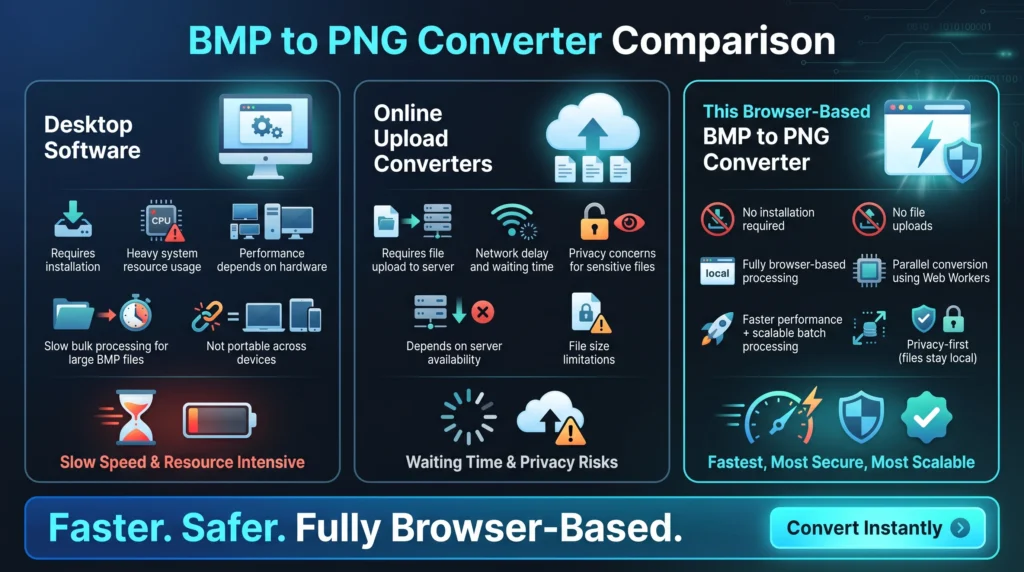
Traditional desktop software is installed locally and consumes system resources. It is useful, but is not very fast in bulk image processing, such as very large BMP images. There is a direct link between performance and hardware capability, resulting in inconsistencies between user systems.
There are other restrictions with uploading based online converters. Before processing these tools ask the user to upload files to an external server. This increases the network latency, waiting time and dependency on the server. It also contains issues regarding data management, particularly with respect to sensitive or proprietary images.
This BMP to PNG converter eliminates both of the constraints by functioning in the browser environment. It does not require any installation and it doesn’t require the upload of any file. All the processing is done locally, meaning that there is less delay and therefore the processing goes faster. Besides, the parallel processing is achieved by Browser based architecture, it enhances the scalability and multiple files can be converted efficiently in parallel.
This ends up being a more uniform, privacy-focused, and performance optimized way to replace desktop and cloud based conversion tools.
SECURITY & PRIVACY
This BMP to PNG converter does all the image processing within the user’s browser. Files are never uploaded to external servers and this means that there is less exposure to third party access and network based risks.
It is an in-memory system, where files are only temporarily created during the time of session. After each session, and/or after each page refresh, all the data that has been processed is removed from memory. This means that no leftover file information is kept on the gadget.
Since there is no outside transfer, users will have complete control of their data throughout the conversion process. This type of architecture is significant for confidential, proprietary or sensitive image assets where privacy is a concern.
The overall system is geared towards risk minimisation and high performance. It allows for both local execution and browser-native security boundaries, providing a secure and controlled environment for image conversion operations.
SEO EXPANSION SECTION
This BMP to PNG converter is in line with high-intent searches relating to image format conversion and browser based image processing applications. It’s designed for people who are actively looking for a BMP to PNG converter online, bulk image converter, secure image conversion solution, etc., that are often in the middle of a workflow or compatibility issue.
The semantic SEO layer is not restricted to exact keyword matching and will be based on the topical areas like raster image processing, bitmap transformation or lossless compression formats etc. These associations contribute to enhancing the relevance of the context for search engines and AI-powered discovery tools.
The tool also captures user demand for modern alternative to traditional desktop software. These users value speed, less reliance on systems and streamlined processes. Its browser-based functionality makes it convenient for users who don’t want to install or upload anything on the server.
Other semantic alignment features are client side processing, parallel execution, and batch files. The concepts highlight the tool’s role as a scalable, high-performance solution for both personal and professional applications.
In general, the SEO construction is geared towards a number of layers of intent, such as direct conversion inquiries, workflow optimization searches, and privacy-focused instrument discovery. This guarantees both traditional search and AI-driven search platforms have excellent visibility.
FAQs
A BMP to PNG converter is a software used to convert a bitmap image file to PNG format. The BMP format is unstructured and typically large, and PNG is superior for compatibility, compression and usability in most of today's platforms. This conversion tool will convert without the need to install software or upload anything to the browser.
Yes, the tool is free of charge to use. No registration, no subscriptions or hidden charges. The users can access the full functionality immediately.
Yes, it is possible to upload and convert several BMP files at once. During bulk operations, processing files in parallel for faster and more efficient operations.
No, it's all done right in your browser. Files are not sent anywhere else and thus privacy is guaranteed during conversion.
Does not need to be installed. It is accessible without any set-up or configuration and operates in modern web browsers.
Yes, completely compatible with today's mobile browsers. Users can convert BMP to smartphones and tablets without any performance issues.
In most cases, yes. PNG is lossless, and thus can have much lower file sizes than uncompressed BMP files, without loss of quality.
Yes, it is possible to export to zip. All converted images can be downloaded at once in a compressed file for convenience and easy file management.
Conclusion
Optimize BMP into PNG instantly with secure, in-browser system. Everything is done locally without upload, installation or external software. This guarantees quicker execution and smooth functioning throughout the process.
It’s designed for those who require consistent performance for individual images or during large-scale batch conversions. It provides scalable processing, privacy-focused execution and efficient file handling without any technical complexity.
The converter is a reliable, streamlined solution whether you’re dealing with legacy image assets, preparing images for design tools, or standardizing image formats for system compatibility.
It is designed to be quick, stable, and provide control over your files, so it’s ideal for both personal and professional use.